Parseur turns emails, PDFs and scans into structured data, and it does that well: it has been in production since 2016 and says it has processed more than 100 million documents. People look for a Parseur alternative for three reasons: the price per page at low volume, credits that expire every month, and a workflow built around email when their documents arrive some other way.
When we asked ChatGPT and Gemini for Parseur alternatives, almost every source they cited was a vendor's own "alternatives" page, and most of those pages listed no prices for the other tools. This guide lists seven alternatives with every price checked on the vendor's own site on 10 November 2026, worked costs at four volumes, and a plain "choose it if" for each. We build ParserBee, so it is in the list; where another tool is the better choice, we say so.
In short: ParserBee is the best Parseur alternative for PDF invoices, orders and statements at low and middle volume: $29 a month for 250 pages, one page credit per page, every line item in its own row. Airparser and Parsio work most like Parseur, with email inboxes and AI fields. Docparser suits a few fixed layouts. Mailparser is the budget pick for plain emails. Lido suits spreadsheet users, and Nanonets suits larger teams that need approvals. Stay with Parseur if most of your data is in email bodies or you process more than 10,000 pages a month.
In this guide:
- Why people look for a Parseur alternative
- The best Parseur alternatives at a glance
- ParserBee: best for PDF documents at a lower price
- Docparser: best for fixed layouts
- Airparser: closest AI email parser
- Parsio: several engines, one account
- Mailparser: budget pick for plain emails
- Lido: spreadsheet-first extraction
- Nanonets: workflows for larger teams
- What each tool costs at four volumes
- When to stay with Parseur
- How to choose
- Frequently asked questions
Why people look for a Parseur alternative
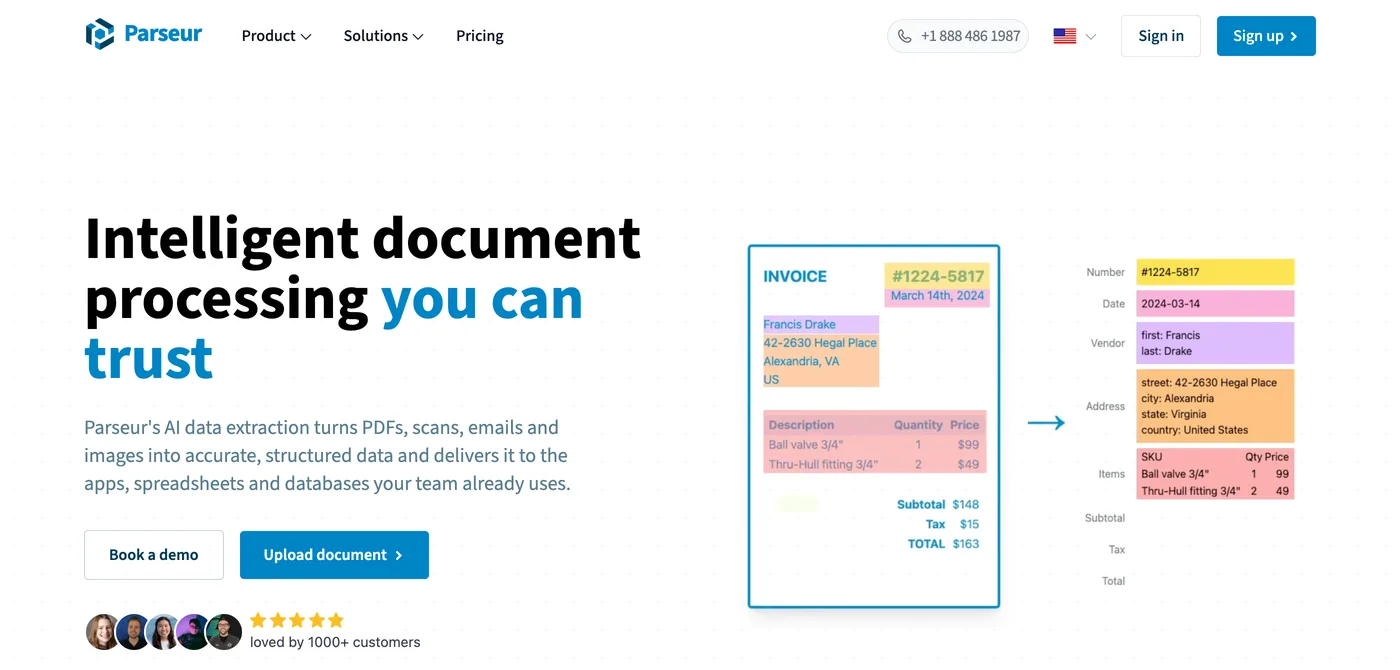
Parseur reads a document in one of two ways: its AI engine finds fields you name in plain English, or its template engine uses a layout you mark up once. Documents come in by email (every account gets unlimited mailboxes), upload or API, and the data goes to Excel, CSV, JSON, Google Sheets, Zapier, Make, Power Automate, webhooks or the API.
The reasons people switch come from Parseur's own pricing page and from public reviews:
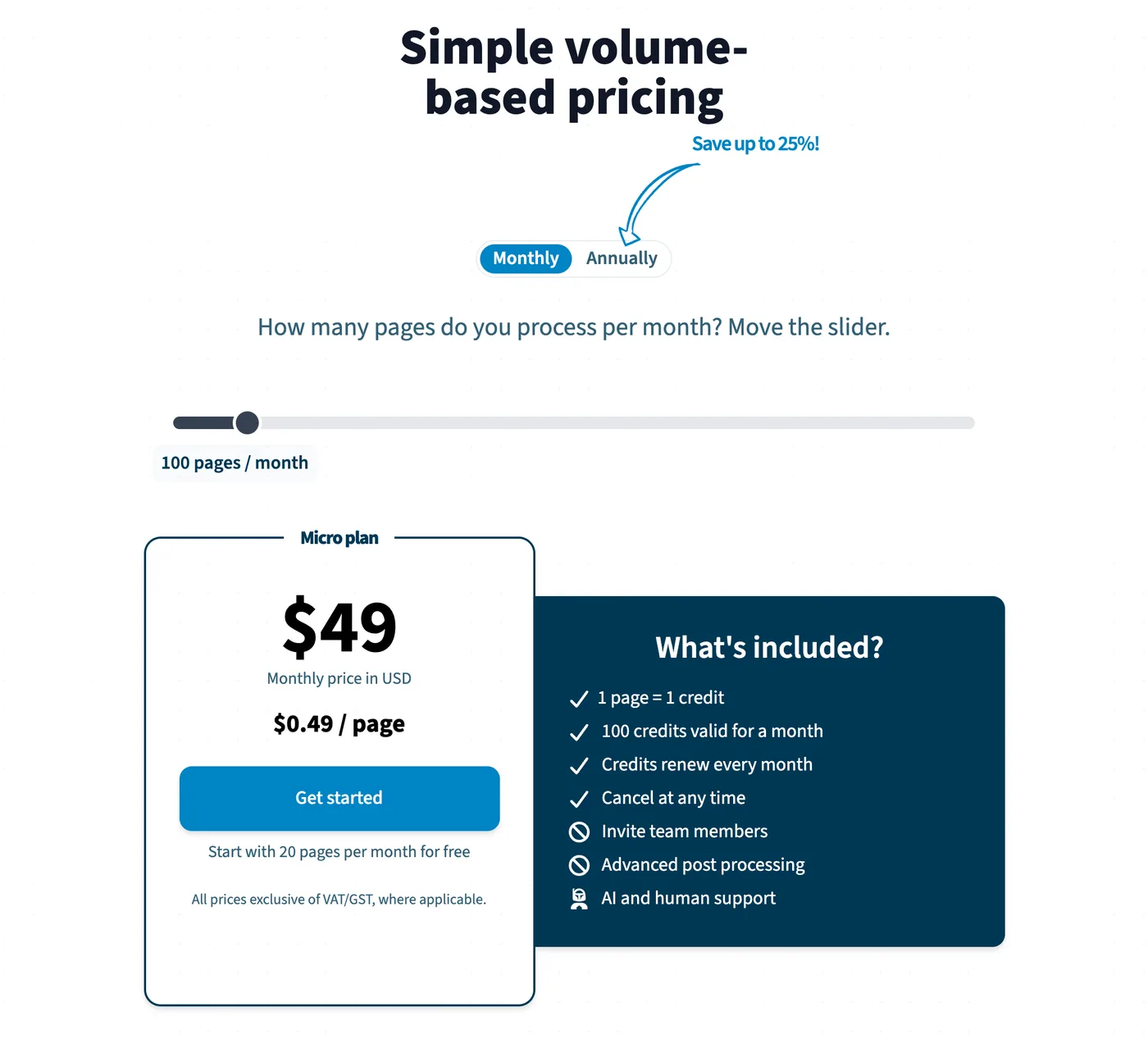
- The entry price per page is high. Micro costs $49 a month for 100 pages on monthly billing, which is $0.49 a page ($39, or $0.39 a page, on annual billing). Reviewers on Capterra say the "cost per page can get expensive, fast".
- Credits expire. Unused credits expire at the end of each billing period, and top-up credits only last until the end of the current period.
- Testing uses credits. The free plan has 20 pages a month, and some reviewers say set-up and testing used up their credits.
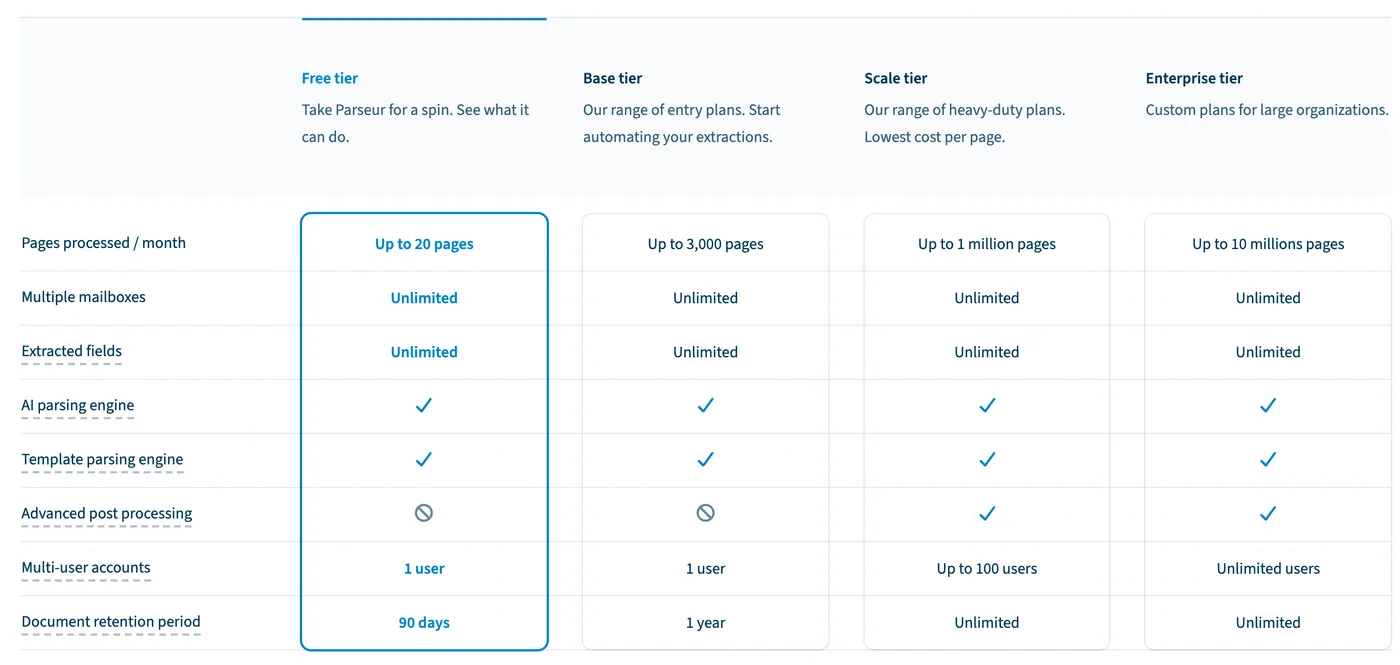
- One user on the lower plans. Free and Base plans (up to 3,000 pages a month) have one user; Scale plans allow up to 100.
- An email-first workflow. Parseur is built around mailboxes. That is ideal for emails, but teams that receive a stack of PDFs, scans or phone photos often want to upload a batch and download one spreadsheet instead.
The best Parseur alternatives at a glance
| Tool | Best for | Entry paid plan | Free start | Email inbox | Scans and photos |
|---|---|---|---|---|---|
| ParserBee | PDF invoices, orders and statements into spreadsheets and apps | $29 a month, 250 pages | 25 pages, never expire | Through Zapier, Make or n8n | Yes |
| Docparser | A few fixed layouts, exact rules | $39 a month, 100 documents up to 5 pages | 14-day trial | Attachments only | Yes |
| Airparser | AI parsing of emails and documents | $33 a month billed annually, 100 credits | 20 credits | Yes | Yes |
| Parsio | Several engines (template, AI, GPT) | $29 a month, 100 credits | 30 credits a month | Yes | Yes |
| Mailparser | Plain recurring emails | $29.95 a month, 250 emails | 30-day trial, 30 credits | Yes | No |
| Lido | Mixed files into spreadsheets | $29 a month, 100 pages | 50 pages | Not listed | Yes |
| Nanonets | Approval workflows at scale | $50 of free credits, then per run | $50 of credits | Not checked | Yes |
| Parseur (for reference) | Email bodies and attachments | $49 a month, 100 pages ($39 annual) | 20 pages a month | Yes, unlimited | Yes |
All prices in US dollars, checked on each vendor's pricing page on 10 November 2026.
1. ParserBee: best for PDF documents at a lower price
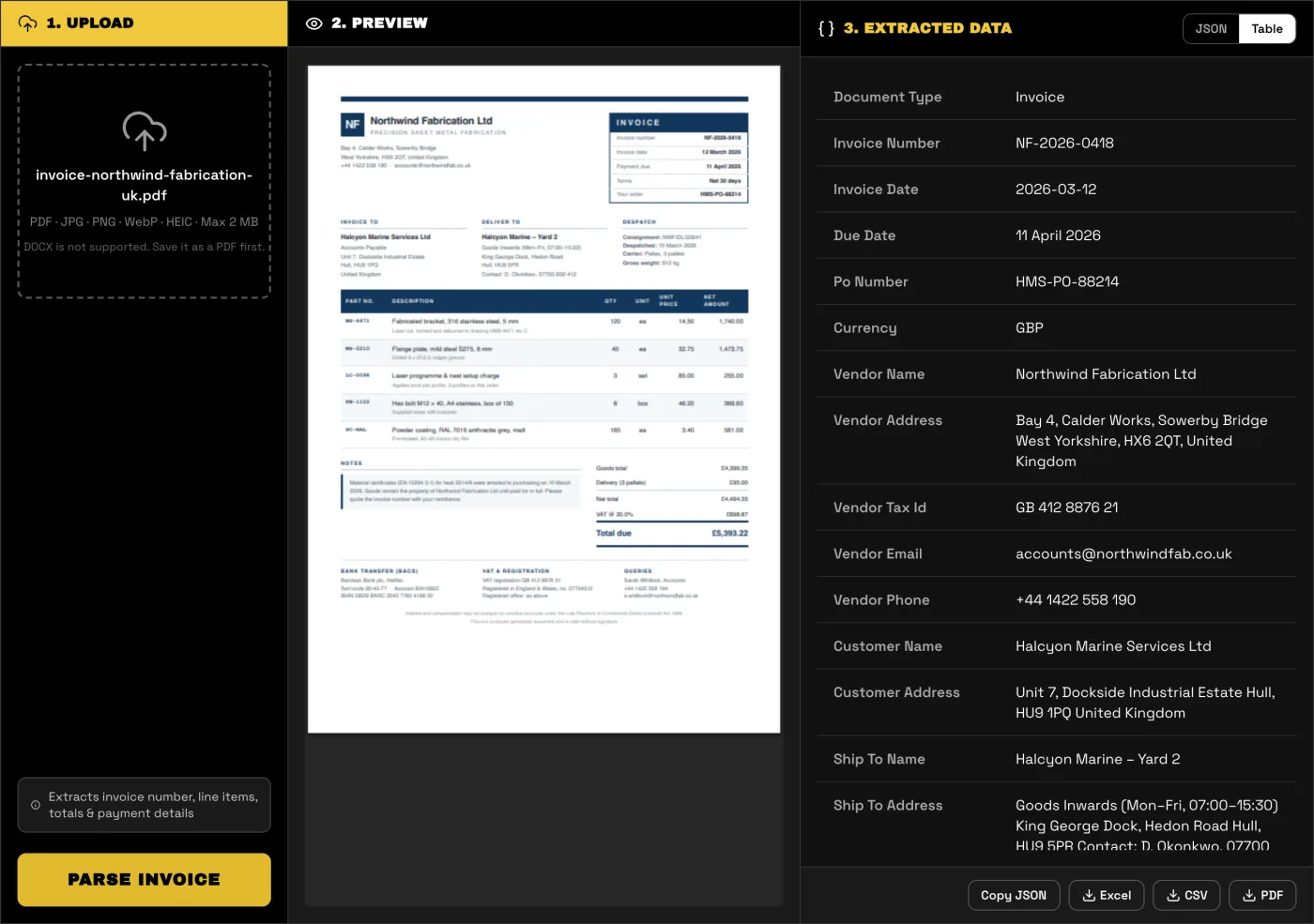
ParserBee is a document parser for business documents: invoices, purchase orders, sales orders, bank statements, bills of lading, remittance advices and forms. You choose the fields you want, and it reads them from every document, whatever the layout. That set of fields is a Parser Template. Pick one of more than 80 ready-made templates, or upload one sample and the AI template builder suggests the fields in about 20 seconds.
Then you run documents three ways:
- Data Lab: drop up to 100 files in one batch and download one spreadsheet, with a row for each line item.
- Linked destinations: link a Parser Template to a Google Sheet or an Airtable table, and every document lands there as new rows.
- Automations and code: pick up email attachments or new files through Zapier, Make or n8n, or call the REST API and MCP server.
Why teams switch to it from Parseur:
- Lower price at low and middle volume. $29 a month for 250 pages is $0.116 a page; Scale is $99 for 1,500 pages ($0.066).
- Trial pages never expire. 25 free pages, no credit card, and extra page credits you buy on a paid plan never expire either.
- Batch upload. Data Lab reads a stack of PDFs, scans and phone photos (PDF, JPG, PNG, WebP and HEIC) and gives you one combined Excel, CSV, PDF or Google Sheets file.
- Every line in its own row. Line items and statement transactions come out as rows, ready to filter or pivot.
- Your own layout. On Scale and above, a custom Excel layout puts each field where you want it, such as a warehouse pick list from a customer order.
- Try it without an account. Free tools for invoices, purchase orders, bank statements, receipts, commercial invoices and bills of lading need no signup.
Where Parseur is still better: ParserBee has no email inbox of its own and does not read email bodies, so email-heavy work needs a Zapier, Make or n8n step. It does not accept DOCX or XLS files (convert them to PDF or XLSX), and it reads PDFs up to 24 pages a file on paid plans. Its largest self-serve plan is 5,000 pages a month; above that, Parseur's annual tiers cost less per page.
Pricing: free trial with 25 pages, no credit card; Starter $29 a month for 250 pages; Scale $99 for 1,500; Business $249 a month (or $2,499 a year) for 5,000. Every plan has every export and integration. See the pricing page.
Test one of your PDFs first
The free invoice parser reads one invoice, every line item included, in seconds. No signup. Compare the result with what Parseur gives you today.
Open the free invoice parser → Or try the purchase order parser
2. Docparser: best for fixed layouts
Docparser is a rule-based parser. You upload a sample, draw zones around the data, add table columns and filters, and the parser applies those rules to every document with that layout. Its SmartAI Parser template can create the first set of rules for you, which you then edit. Documents arrive by upload, email attachment, Dropbox, Box, Google Drive, OneDrive or the API.
- Pricing: Starter $39 a month (or $32.50 billed annually) for 100 credits and up to 15 parsers; Professional $74 ($61.50) for 250 credits; Business $159 ($133) for 1,000 credits, with multi-layout parsers included. One credit is one document of up to 5 pages, so multi-page documents are cheap. 14-day trial, no credit card, and one free set-up session where Docparser builds your first parser with you.
- Choose it if you receive the same few layouts every month, need exact and repeatable results, or need barcode and QR reading, checkboxes or XML export.
- Skip it if you have many suppliers with different layouts: each new layout means new rules, and multi-layout parsers cost $29.95 a month extra below the Business plan.
If you already use Docparser and the rule upkeep is the problem, see our comparison of Docparser alternatives that need no parsing rules.
3. Airparser: closest AI email parser
Airparser works most like Parseur's AI engine: you list the fields you want, forward emails or upload documents, and it returns structured data to webhooks, the API or integrations. It reads scans and handwriting with OCR and offers an AI code assistant for post-processing.
- Pricing (billed annually): Starter $33 a month for 100 credits, Growth $49 for 500, Business $149 for 2,000, Premium $249 for 5,000. One credit is one PDF page, email or image. Free trial with 20 credits. Unused credits expire at the end of each period.
- Choose it if you like Parseur's email-in workflow and want more pages for the money at 500 to 5,000 credits.
- Skip it if your team needs several logins on a small budget: unlimited team members are listed only on the Business and Premium plans.
4. Parsio: several engines, one account
Parsio offers four engines in one account: a template parser for fixed emails and documents, a pre-trained AI parser, a GPT-powered parser and an OCR converter. You pick the engine per mailbox. It sends data to Google Sheets, Zapier, Make, n8n, webhooks and the API.
- Pricing: free plan with 30 credits a month; 100 credits for $29 a month ($290 a year); 1,000 credits for $49 a month ($490 a year), with larger plans up to 100,000 credits. Credits per page depend on the engine: 1 for the template parser and OCR, 2 for the GPT parser, 3 for the AI parser. So 1,000 credits are 1,000 template pages but only 333 AI pages.
- Choose it if you have a mix of fixed emails (cheap on the template engine) and messy PDFs (AI engine) and want both in one tool.
- Skip it if most of your work needs the AI engine: at 3 credits a page, the low headline price triples.
5. Mailparser: budget pick for plain emails
Mailparser is a rule-based email parser from the same company as Docparser. You set up an inbox, write parsing rules for a recurring email (an order notification, a lead form), and it sends the fields to a spreadsheet, webhook or integration.
- Pricing (monthly): Starter $29.95 for 250 emails, Professional $39.95 for 500, Business $99.95 for 2,000, Premium $299.95 for 10,000. Annual billing is cheaper. 30-day trial with 30 credits.
- What it reads: email bodies plus CSV, XLSX, DOCX, PDF and TXT attachments. It does not read scans or images; Mailparser points those to Docparser.
- Choose it if your data is in plain, predictable emails.
- Skip it if your attachments are scans, photos or invoices with varied layouts.
If you only need one simple email type inside a Zap, Email Parser by Zapier is another option: you highlight and name the text in a sample email, and later emails follow that template.
6. Lido: spreadsheet-first extraction
Lido extracts data from PDFs and other files into a spreadsheet. It says fields are described in plain English, with no templates to maintain.
- Pricing: Standard $29 a month for 100 pages with one user; Scale $7,000 a year for 42,000 pages with up to 10 users, the API and workflows; Enterprise from $35,000 a year. 50 free pages, no credit card.
- Choose it if you work in spreadsheets and process up to 100 pages a month, or you are ready for an annual contract at high volume.
- Skip it if you are between those two: there is no plan between 100 pages a month and $7,000 a year.
7. Nanonets: workflows for larger teams
Nanonets is a document automation platform. Beyond extraction it builds workflows of blocks: classification, validation, approvals and export to accounting systems.
- Pricing: start free with $50 of credits. After that you pay per block run: $0.02 for simple steps such as formatting or export, $0.10 for standard AI steps, $0.30 for data extraction. Nanonets estimates a typical invoice workflow (4 to 6 blocks) at under $2 an invoice. Volume pricing and an enterprise plan are quoted.
- Choose it if you need approvals, validation rules and ERP export in one tool and have the budget.
- Skip it if you only need the data in a spreadsheet: at about $0.30 a page for extraction alone, it costs several times more than the tools above.
What each tool costs at four volumes
Here is the cheapest plan that covers each monthly volume, on monthly billing unless we say otherwise. We assume one-page PDF documents. For emails, remember that Parseur, Airparser and Mailparser count an email as one page or credit however long it is.
| Pages a month | ParserBee | Parseur | Docparser | Airparser (annual) | Parsio (AI engine, 3 credits a page) |
|---|---|---|---|---|---|
| 100 | $29 (Starter, 250 pages) | $49 (Micro), $39 annual | $39 (Starter) | $33 (Starter) | $49 (1,000 credits) |
| 250 | $29 (Starter) | $89 (Mini, 300 pages), $69 annual | $74 (Professional) | $49 (Growth, 500) | $49 (1,000 credits) |
| 1,000 | $99 (Scale, 1,500 pages) | $129 (Starter), $99 annual | $159 (Business) | $149 (Business, 2,000) | $149 (5,000 credits) |
| 3,000 | $249 (Business, 5,000 pages) | $269 (Premium), $199 annual | Enterprise quote | $249 (Premium, 5,000) | $299 (12,000 credits) |
So who wins on price?
- ParserBee costs the least, or ties, from 100 to about 1,500 pages a month on monthly billing. At 100 pages, Lido and Parsio's template engine are also $29.
- Parseur's annual plans catch up at 1,000 pages ($99 a month, the same as ParserBee's Scale) and win at 3,000 pages ($199 a month) and above. At 10,000 pages, Parseur Pro is $399 a month billed annually ($0.04 a page).
- Docparser wins for long documents. One credit covers up to 5 pages, so 100 five-page contracts cost one $39 Starter plan.
- Email-only work favours the email parsers. A 3,000-word order email is one credit on Parseur, Airparser or Mailparser.
Run a month of documents for free
Start with 25 free pages that never expire, no credit card. Upload a batch to Data Lab and download one spreadsheet, a row for every line item.
When to stay with Parseur
Parseur has real strengths that most of the tools above do not match:
- Email bodies. Unlimited mailboxes that read the email itself, not only its attachments. Order notifications, booking emails and lead alerts are its home ground.
- File formats. Its help centre lists PDF, DOC and DOCX, XLS and XLSX, TIFF, MSG and MBOX among many others, and PDFs of hundreds of pages.
- Two engines. AI fields for varied layouts and a template engine for documents that never change.
- Languages and compliance. OCR in more than 200 languages, EU hosting and SOC 2 Type II, per its homepage.
- Volume. Self-serve plans up to 250,000 pages a month and the lowest per-page price above about 3,000 pages.
If those matter most to you, Parseur is still a good choice. If your documents are mainly PDFs, scans and photos, and your volume is under a few thousand pages a month, an alternative will probably cost less.
How to choose
Choose ParserBee if:
- Your documents are PDF invoices, purchase orders, statements, bills of lading or forms, and you process up to a few thousand pages a month.
- You want to upload a batch and download one spreadsheet, or have every document land in Google Sheets or Airtable.
- You want trial pages and bought credits that never expire.
Choose Airparser or Parsio if you want Parseur's email-in workflow at a lower price. Choose Docparser if you have a few fixed layouts and want exact rules. Choose Mailparser if your data is in plain emails. Choose Lido if you work in spreadsheets at very low or very high volume. Choose Nanonets if you need approvals and ERP export.
Whichever you shortlist, test the same three documents on each: your longest invoice, a crooked scan and a phone photo. For a wider view, see our guide to the best invoice OCR software.
Try the Parseur alternative built for PDFs
One page credit per page, every line item in its own row, results in seconds. 25 free pages that never expire, and no credit card.
Frequently asked questions
What are good alternatives to Parseur?
For PDF invoices, purchase orders and other business documents, ParserBee is the closest match at a lower price: $29 a month for 250 pages against Parseur's $49 a month for 100. Docparser suits teams with a few fixed layouts who want exact parsing rules. Airparser and Parsio are close to Parseur in how they work, with email inboxes and AI fields. Mailparser is a cheaper choice for plain emails, Lido suits spreadsheet users with mixed files, and Nanonets suits larger teams that want approval workflows.
Parseur is too expensive. What else can I use?
At low and middle volumes, several tools cost less per page. ParserBee is $29 a month for 250 pages ($0.116 a page), Lido is $29 a month for 100 pages, Airparser is $49 a month for 500 credits on annual billing, and Parsio's template engine is $49 a month for 1,000 credits. Parseur is $49 a month for 100 pages on monthly billing ($0.49 a page) or $39 on annual billing. Above about 10,000 pages a month, Parseur's annual plans get cheaper per page than most of these. Prices checked on each vendor's site on 10 November 2026.
What are tools like Parseur for PDF attachments?
Airparser, Parsio and Mailparser all give you an email address that reads attachments, like Parseur. Mailparser reads PDF, CSV, XLSX, DOCX and TXT attachments but not scans or images. ParserBee and Docparser read PDF attachments too: Docparser imports email attachments directly, and ParserBee picks them up from Gmail or Outlook through a Zapier, Make or n8n automation.
Which Parseur competitor is better at table extraction?
For invoices and orders with many lines, an AI tool that reads every line into its own row works best when layouts vary: ParserBee writes one spreadsheet row per line item, whatever the supplier's layout. Docparser is the strongest choice when a few layouts never change, because you draw the table columns yourself and the result is exact. Test your longest, messiest document on any tool before you buy.
Is there a free Parseur alternative?
Parsio has a free plan with 30 credits a month and Airparser a free trial with 20 credits. ParserBee gives every new account 25 free pages that never expire, and its free invoice parser, purchase order parser and bank statement converter need no signup. Parseur's own free plan gives 20 pages every month.
Does ParserBee have an email inbox like Parseur?
Not of its own. ParserBee reads attachments that a Zapier, Make or n8n automation picks up from Gmail, Outlook or a shared inbox. If most of your documents are email bodies, such as order notifications or lead alerts, Parseur, Mailparser or Airparser fit better.
How much does Parseur cost in 2026?
Parseur has a free plan with 20 pages a month. Paid plans start at Micro, $49 a month for 100 pages ($39 a month billed annually), then Mini $89 for 300 pages, Starter $129 for 1,000, Premium $269 for 3,000 and Pro $499 for 10,000, with larger tiers up to 250,000 pages. One page is one credit; an email or spreadsheet counts as one page. Unused credits expire at the end of each billing period. Checked on parseur.com/pricing on 10 November 2026.