Every purchase order is typed at least twice. The buyer types it into their system to create it. Then the supplier types it again into theirs to fulfil it. Later, somebody on the buyer’s side types the invoice in and checks it against the PO by eye. Three sets of hands, one document, and each pair of hands is a chance to get a quantity, a price or a delivery date wrong.
Purchase order automation is the collective name for removing those keystrokes. Depending on which side of the PO you sit on, that can mean anything from a full procurement platform with approval chains, to a fifteen-minute setup that reads the POs arriving in your inbox and drops the data into a spreadsheet or your ERP.
This guide covers the whole picture in plain English: what PO automation actually is, what skipping it costs, the three kinds you can buy (and which one you need), how AI reads a purchase order, and a step-by-step setup you can complete this afternoon without a developer. We build ParserBee, an AI document parser, so we know the extraction side of this well. We also say clearly where it is not the right tool.
TL;DR: If you issue purchase orders and need requisitions and approvals, you want a procurement tool or your ERP’s purchasing module. If you receive purchase orders from customers, or need to match POs against supplier invoices, the bottleneck is reading the document, and an AI document parser fixes that for a fraction of the cost. ParserBee reads any PO layout with no per-customer setup, and gets you from a stack of PDFs to a clean spreadsheet or a Zapier flow into your ERP in about fifteen minutes. Try it on a real PO free, no account needed.
In this guide:
- What is purchase order automation?
- What a purchase order contains
- What manual PO processing really costs
- The PO process step by step, and what automation changes
- Which kind of PO automation do you need?
- Your options compared
- How AI reads a purchase order
- How to automate purchase orders without a developer
- PO automation vs invoice automation, and three-way matching
- Mistakes to avoid
- How to measure whether it worked
- FAQ
What is purchase order automation?
A purchase order (PO) is the document a buyer sends a supplier to say: we want these items, in these quantities, at these prices, delivered here by this date. Once the supplier accepts it, it is a binding order and the reference point for everything that follows: the delivery note, the invoice and the payment.
Purchase order automation means using software to handle the steps around that document that a person would otherwise do by hand. Which steps depends on where you sit:
- On the buying side, it means generating the PO from an approved request, routing it for sign-off, sending it to the supplier, and later checking the supplier’s invoice against it before paying.
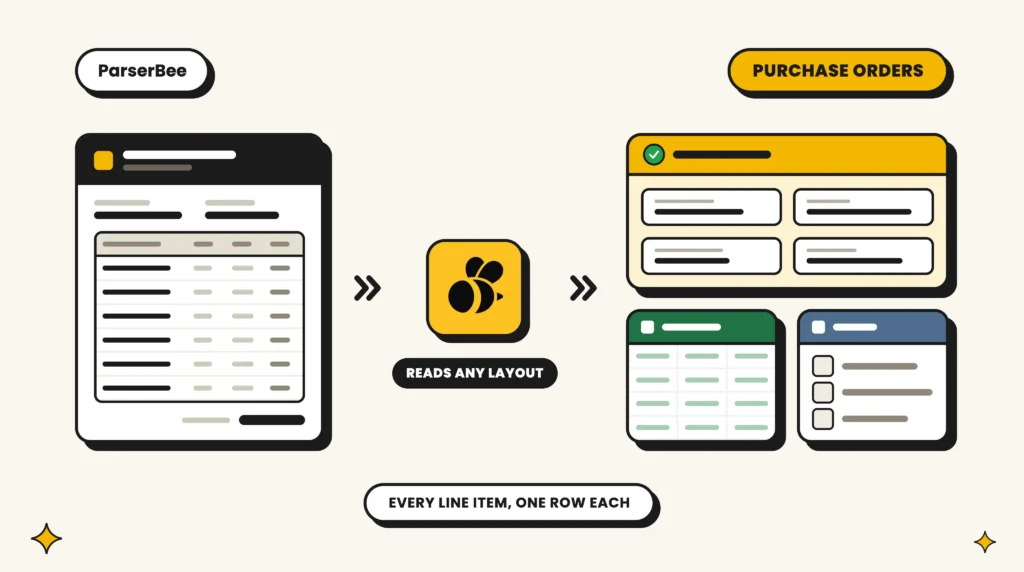
- On the selling side, it means taking the PO a customer sends you (usually a PDF attached to an email, in whatever layout their system produces) and turning it into a sales order in your own system without anyone retyping it.
Most articles about PO automation only describe the first case, because that is what enterprise procurement software sells. But the second case is where the most keystrokes actually happen in small and mid-sized businesses: an order desk receiving thirty different customers’ PO formats and keying each one into the ERP. We cover both.
The common thread is that at some point a document has to be read: its PO number, vendor, line items and totals have to become data fields in a system. That reading step is what modern AI does well, and it is what the rest of this guide leans on.
What a purchase order contains
Before you can automate anything, it helps to know exactly which fields you are trying to capture. Nearly every PO carries the same core set, whatever the layout:
| Section | Field | Why it matters downstream |
|---|---|---|
| Header | PO number | The key that links the order to the delivery note and invoice |
| Header | PO date | Sets the clock for delivery and payment terms |
| Header | Vendor / supplier name and address | Which account to book the order against |
| Header | Buyer name and billing address | Who is paying and where the invoice goes |
| Header | Delivery (ship-to) address | Often different from billing; the most common thing to get wrong |
| Header | Requested delivery date | Drives scheduling on the supplier side |
| Header | Payment terms | Net 30, 2/10 net 30 and so on |
| Line items | Item code / SKU | Matches the product in your catalogue |
| Line items | Description | Human-readable check on the SKU |
| Line items | Quantity | Must match what is shipped and invoiced |
| Line items | Unit price | The agreed price; catches invoice overcharges later |
| Line items | Line total | Quantity times unit price; a built-in arithmetic check |
| Totals | Subtotal, tax, total | The amount that will eventually be invoiced |
| Approval | Authorised by | Who signed it off |
The line items are the hard part. A PO with 40 lines is 40 rows of quantities and prices that have to stay aligned, and a single row shifted by one is worse than a blank, because it looks right.
ParserBee’s ready-made purchase order Parser Template captures exactly this set: the header fields, a repeating list of line items (item code, description, quantity, unit price, line total), the totals, payment terms and authoriser. You can use it as-is or remove fields you do not need.
What manual PO processing really costs
“It only takes a few minutes per PO” is true and beside the point. The cost is in the volume, the errors and the delay.
Time and cost per PO. APQC’s procurement benchmarks put the total cost to process a single purchase order at anywhere from about $14 at top-performing organisations to more than $54 at the bottom, a fourfold gap driven mostly by how much of the process is manual. At 300 POs a month, the difference between those two figures is roughly $12,000 a month.
Error rate. Studies of manual data entry put transcription error rates between 1% and 4%. A PO has ten header fields and perhaps five fields per line. On a 20-line order, that is over a hundred typed values, which means that at a 1% error rate the average manually keyed PO of that size contains at least one mistake.
What the errors cost. A wrong quantity means a short shipment or an overstock. A wrong ship-to address means a delivery to the wrong site. A wrong unit price means an invoice that fails to match and sits in a dispute queue for weeks, or worse, matches and overpays. None of these show up as “data entry cost” in anyone’s budget; they show up as freight, credits, write-offs and phone calls.
Delay. When keying POs is a chore, they wait. On the supplier side, a PO that sits in an inbox for a day is a day added to the lead time the customer sees. On the buyer side, a PO that is slow to raise means the goods arrive late, and the invoice that arrives before the PO exists cannot be matched to anything.
The purchase order process, step by step
Here is the full cycle, with what changes at each step when it is automated. Steps 1 to 4 belong to the buyer, step 5 to the supplier, and steps 6 to 8 to the buyer again.
| # | Step | Manual | Automated |
|---|---|---|---|
| 1 | Request (requisition) | Someone emails “we need 50 of these” | A form captures item, quantity, budget code |
| 2 | Approval | Chased over email or Slack | Routed by rule: over $5,000 goes to the director |
| 3 | PO creation | Typed into a template or the ERP | Generated from the approved request |
| 4 | Send to supplier | Emailed as a PDF | Sent automatically, or via a supplier portal |
| 5 | Supplier receives and enters the order | Order desk retypes the PO into their ERP | AI reads the PDF and creates the sales order |
| 6 | Goods received | Paper delivery note filed | Receipt logged against the PO number |
| 7 | Invoice arrives | Compared to the PO by eye | Extracted and matched to PO and receipt automatically (three-way match) |
| 8 | Payment | Approved by whoever checked it | Paid automatically when everything matches; only exceptions need a person |
Notice that steps 1 to 4 are workflow problems (who approves what, in which order) and steps 5 and 7 are document reading problems (turning a PDF into fields). They need different tools, which brings us to the question most guides skip.
Which kind of PO automation do you need?
Answer one question honestly: where do the keystrokes happen in your business today?
Scenario A: you issue POs and the pain is approvals
Your team raises POs to suppliers, and the slow part is getting them requested, approved and created consistently. People buy things without a PO because raising one is a hassle.
What you need: workflow automation. A procurement tool (ProcureDesk, Precoro, Order.co and the like), or the purchasing module of your accounting or ERP system (QuickBooks, Xero, NetSuite and Dynamics all have one). This is not what ParserBee does, and an AI document parser will not help here, because there is no incoming document to read.
Scenario B: you receive POs from customers
Customers send you POs as PDF attachments, each in their own layout, and somebody keys them into your order system. This is the classic order-desk problem in distribution, manufacturing, wholesale, print and packaging, and it is the single most common form of PO data entry in small and mid-sized businesses. On the seller’s side this job is called sales order entry, and our guide to sales order automation compares the tools built for it.
What you need: document capture. An AI parser reads every incoming PO regardless of layout and hands you structured data (or pushes it straight into your ERP through an automation tool). This is exactly what ParserBee is built for, and the step-by-step setup below is for you.
Scenario C: you issue POs and the pain is matching invoices to them
Raising POs is fine. The problem is at the other end: supplier invoices arrive and someone has to find the PO, compare line by line, and decide whether to pay.
What you need: invoice capture plus matching rules. Extract the invoice fields with an AI parser, look up the PO number in your system, and compare quantities and prices automatically. ParserBee handles the extraction half (see our invoice OCR software comparison); the matching lives in your accounting system or a Zapier step. Full AP suites do both in one product at a much higher price.
Most businesses are a mix. A distributor is in Scenario B for customer orders and Scenario C for supplier invoices. The point is to name the bottleneck before buying anything, because a procurement platform will not read your customers’ POs, and a document parser will not build you an approval chain.
Your options compared
| Approach | What it does | Setup effort | Typical cost | Best for |
|---|---|---|---|---|
| ERP or accounting purchasing module | Creates POs, tracks receipts, basic matching | Days to weeks (configuration) | Often included in your plan, or a per-user add-on | Scenario A at small scale |
| Procurement suite | Requisitions, approvals, catalogues, supplier portals, PO creation | Weeks to months | Per user per month, usually mid three figures upward | Scenario A at mid-market and above |
| AP automation suite | Invoice capture, PO matching, approvals, payment | Weeks to months, sales-led | Often five figures a year | Scenario C at high volume |
| AI document parser + automation tool (ParserBee + Zapier, Make or n8n) | Reads incoming POs or invoices in any layout, pushes fields to your systems | About an hour, no developer | From $29/month | Scenarios B and C at SMB and mid-market |
| Template-based OCR | Reads documents with a fixed layout you define per sender | Hours per layout, ongoing maintenance | From about $39/month | A handful of stable, identical layouts |
| RPA bots | Scripted clicking and typing into your existing screens | Weeks, developer required | Licence plus developer time | Legacy systems with no API |
| Custom build on a cloud OCR API | Whatever your developers make it do | Weeks to months | Low per page, high in engineering time | Teams with engineers and unusual needs |
The row that matters for most readers of this guide is the fourth one. Five years ago, reading a customer’s PO reliably meant either an expensive suite or a template built by hand for each customer that broke every time they changed their layout. AI parsing removed both problems: it reads a layout it has never seen, and it costs the same as a software subscription rather than an implementation project.
How AI reads a purchase order
It helps to understand what actually happens when a PO goes through an AI parser, because it explains both why it works on layouts it has never seen and where it can still go wrong.
1. Ingest. The PO arrives as a PDF, a scan, a phone photo, or occasionally as an Excel file or an email body. A good parser accepts all of them. ParserBee takes PDF, PNG, JPG, WebP, HEIC, Excel, CSV, HTML, EML and several Office formats, so a PO exported straight from a customer’s spreadsheet is not a special case.
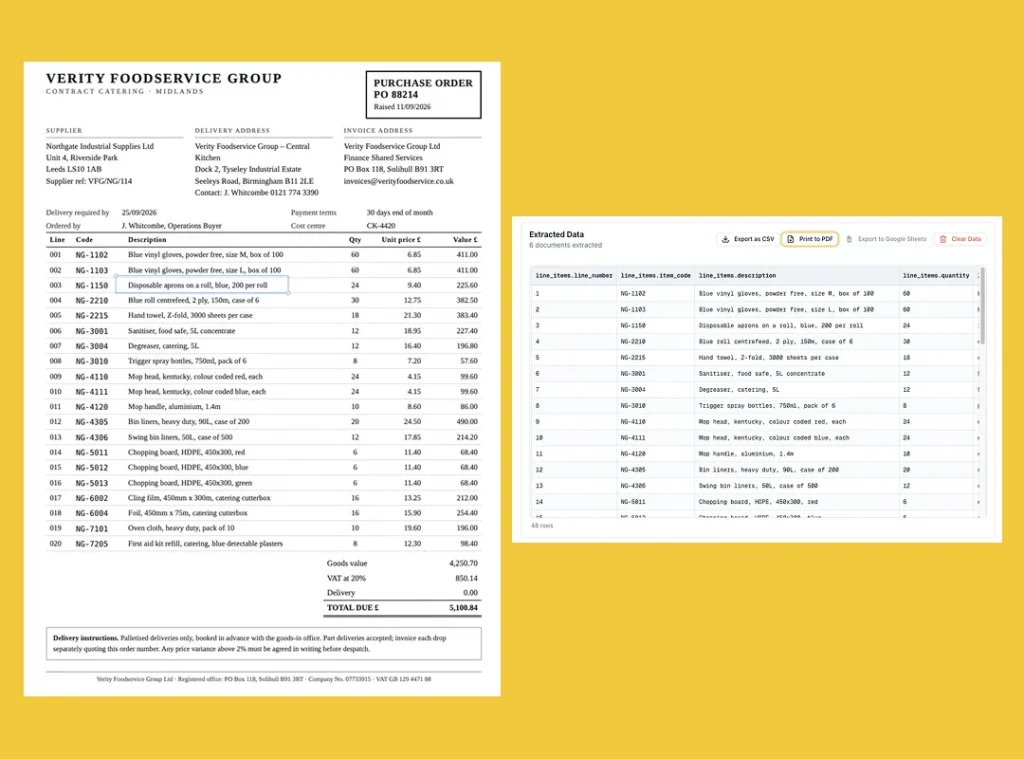
2. Read. Our AI engine performs OCR (turning the pixels into text) and, in the same pass, understands the layout: which text is a table, which is a header block, which numbers are quantities and which are prices. This is the step older OCR could not do. Traditional OCR gives you a wall of text; it does not know that “12” in the third column is a quantity. Our free purchase order OCR tool runs this same step on a single PO, with no account.
3. Structure. The parser fills in the fields you asked for. In ParserBee, you define those fields once in a Parser Template, in plain English: “The purchase order number, usually top right,” “The list of items ordered, one row per line, with code, description, quantity, unit price and line total.” Because the AI works from meaning rather than position, the same template reads a PO from a customer who puts the PO number top left and another who buries it in the footer.
4. Validate. Some checks can be automatic: does quantity times unit price equal the line total? Do the line totals add up to the subtotal? Is the PO number in the format this customer always uses? Anything that fails goes to a person. Everything else goes straight through.
5. Deliver. The structured data lands wherever it is useful: a spreadsheet, Google Sheets, a CSV for import, or via API and Zapier straight into your ERP as a new sales order.
Here is what step 3 produces for a typical PO:
{
  "poNumber": "PO-2026-04471",
  "poDate": "14/09/2026",
  "vendorName": "Northgate Industrial Supplies Ltd",
  "vendorAddress": "Unit 4, Riverside Park, Leeds LS10 1AB",
  "deliveryAddress": "Halden Manufacturing, Bay 3, Kings Road, Sheffield S9 2XY",
  "requestedDeliveryDate": "28/09/2026",
  "lineItems": [
    { "itemCode": "NG-4410", "description": "M10 hex bolts, zinc plated, box of 100", "quantity": 25, "unitPrice": 18.40, "totalPrice": 460.00 },
    { "itemCode": "NG-4412", "description": "M10 flange nuts, box of 100", "quantity": 25, "unitPrice": 11.20, "totalPrice": 280.00 },
    { "itemCode": "NG-7020", "description": "Nitrile gloves, size L, box of 200", "quantity": 10, "unitPrice": 14.95, "totalPrice": 149.50 }
  ],
  "subtotal": 889.50,
  "taxAmount": 177.90,
  "totalAmount": 1067.40,
  "paymentTerms": "Net 30",
  "authorizedBy": "R. Okafor, Procurement Manager"
}
Every line item is its own row with its own fields, which is what makes the data usable: it can be imported as three order lines, not pasted as one blob of text.
How to automate purchase orders without a developer
This is the setup for Scenario B (you receive POs) and the extraction half of Scenario C. It uses ParserBee’s no-code workflow and takes about fifteen minutes for the batch version, plus another twenty if you want the fully hands-off email version at the end.
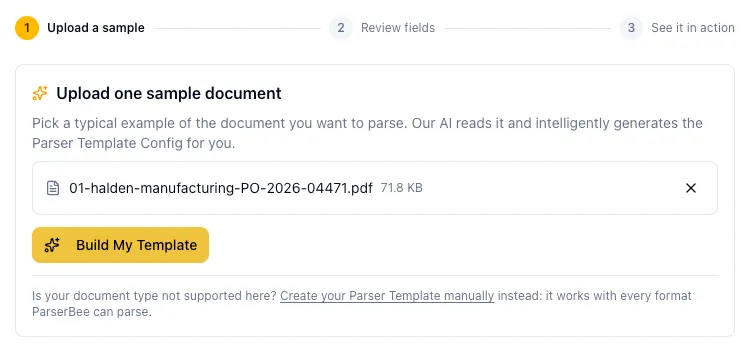
Step 1: Build your Parser Template from one real PO
Sign up at parserbee.com (25 pages free, no card, and the free pages do not expire). Create a new Parser Template and choose Build it with AI. Upload one real purchase order from a customer, the messier the better. Our AI engine reads it and proposes the fields: PO number, date, vendor, addresses, a line-item list, totals, terms.
If you would rather start from a checked field list, pick the Purchase Order entry in the Template Library instead. It carries the full field set from the table earlier in this guide.
Step 2: Review the fields and tidy the descriptions
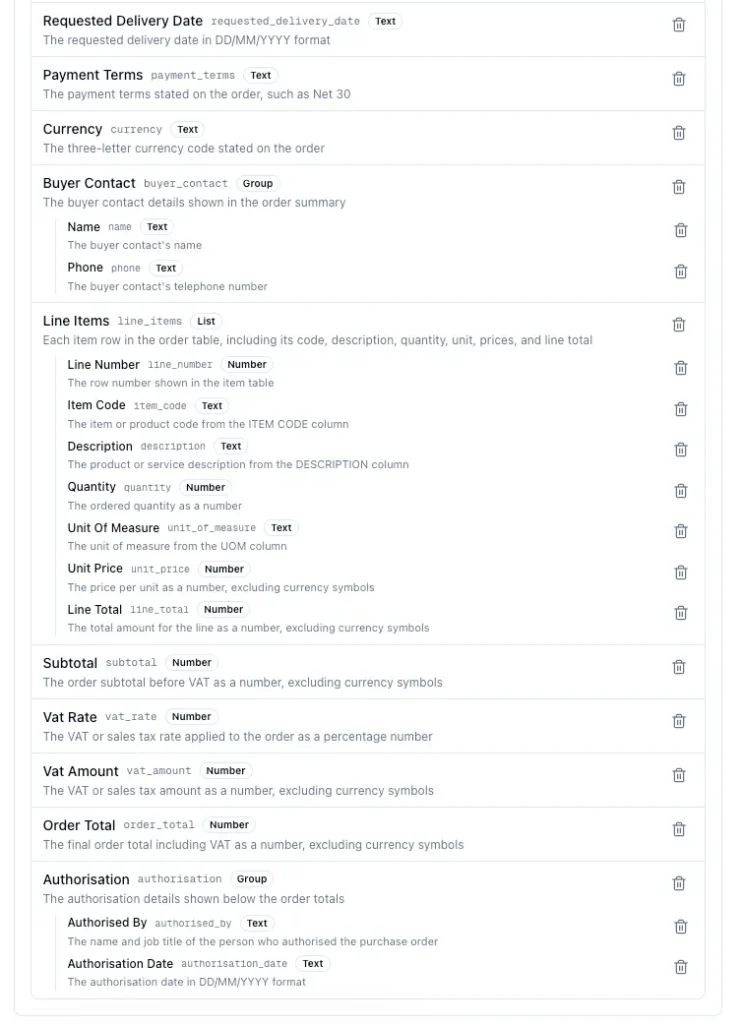
The wizard shows each proposed field with a plain-English description of what to extract. Remove anything you do not need. Sharpen anything ambiguous. Two edits pay off more than any others on POs:
- Dates. Write the format into the description: “The requested delivery date, formatted as DD/MM/YYYY.” Customers write dates every way there is; this makes every one come out the same, so your spreadsheet sorts and your ERP import does not choke.
- Ship-to versus bill-to. Make the two address descriptions explicit: “The address the goods should be delivered to, not the invoicing address.” The AI is good at this distinction, but a clear instruction removes the last doubt.
Step 3: See it run on your sample
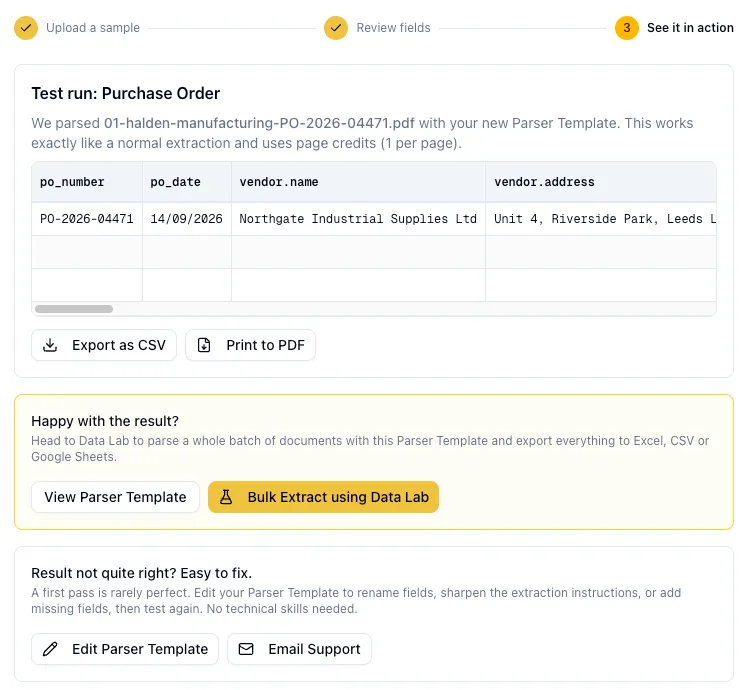
The wizard runs a real extraction on the PO you uploaded and shows the result as a table, line items and all. Check it against the document. If something is off, the “Edit Parser Template” button takes you straight back to the field descriptions; usually one clearer sentence fixes it.
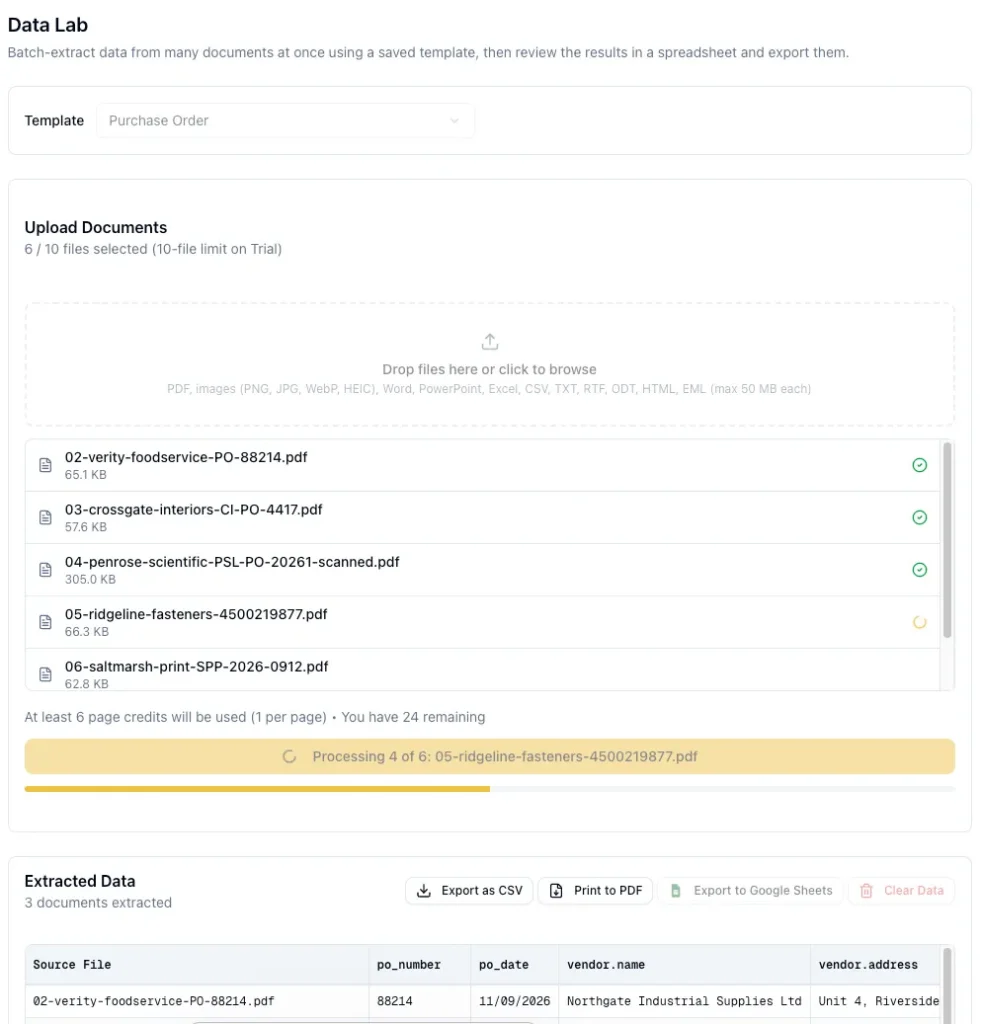
Step 4: Process a batch in Data Lab
Open Data Lab, select your Parser Template, and drag in a batch of POs: up to 10 files per batch on the free plan and 100 on paid plans. Click Extract Data. Each PO is processed in turn, with a progress bar, and every result appears as rows in a live spreadsheet on the same page. A PO with 20 line items becomes 20 rows, each tagged with its source file. When the batch finishes, you get a summary and a list of anything that failed, with the reason.
Two limits worth knowing before you start: each file can be up to 50 MB, and PDFs are capped at 12 pages on the free plan and 24 on paid plans. Real POs rarely come close, but a spreadsheet exported with the wrong print range can.
Step 5: Export, or send it straight to Google Sheets
Click Export as CSV to get a file your ERP or order system can import, or Export to Google Sheets to create a formatted sheet in your Drive in one click (ParserBee only gets permission to touch sheets it creates, nothing else in your Drive). There is also Print to PDF if you want a human-readable record with one page per PO.
That is the batch workflow: a folder of customer POs to an import-ready CSV, two clicks and a coffee.
Optional: make it fully hands-off with Zapier
If POs arrive one at a time by email and you want them in your system the moment they land, add Zapier (Make and n8n work the same way through ParserBee’s API):
- Trigger: New attachment in Gmail or Outlook, filtered to your orders inbox.
- Action: Save the attachment somewhere with a public link (Google Drive with link sharing, Dropbox, or Zapier’s own file storage). This step matters: the ParserBee Zapier action needs a Document URL it can fetch, not the raw file.
- Action: ParserBee, Extract Data From Document. Two fields: your Parser Template ID and the Document URL from step 2.
- Action: Create the record wherever you want it: a new row in Google Sheets, a sales order in your ERP, an estimate or PO in QuickBooks, a record in Airtable. Zapier’s Line Items support lets you map the repeating line items into apps that accept them.
Full walkthrough with screenshots: Zapier PDF data extraction: the complete guide. If your organisation runs on Microsoft, the same pattern works in Power Automate.
Try it before you build anything
Drop one of your own POs into the free purchase order parser. No account, and you see the extracted fields in a few seconds. If it reads your ugliest customer’s layout, it will read the rest.
PO automation vs invoice automation
People use the two terms interchangeably, and they are related, but they sit at different points in the cycle:
- PO automation is about the order: creating it (buyer side) or capturing it (supplier side). It happens before anything ships.
- Invoice automation is about the bill: capturing the supplier’s invoice and deciding whether to pay it. It happens after delivery.
The place they meet is three-way matching. Before paying an invoice, the buyer checks that three documents agree: the PO (what we ordered, at what price), the goods receipt (what actually arrived), and the invoice (what the supplier is charging). If quantities and prices line up within tolerance, the invoice is approved with no human involvement. If they do not, it goes to a person with the discrepancy already highlighted.
How automated PO matching works in practice: the invoice is extracted (supplier, invoice number, PO reference, line items). The PO reference is looked up in your system. Each invoice line is compared with the matching PO line on quantity and unit price, and with the receipt on quantity delivered. A rule decides what “close enough” means (many businesses allow a small price tolerance and none on quantity). Matches are approved; mismatches are queued.
ParserBee provides the extraction step for both the PO and the invoice. The lookup and comparison happen in your accounting system, in a Zapier or Make workflow, or in an AP suite if you have one. If matching is your main pain and you have high invoice volume, read our invoice automation software comparison, which covers the tools that bundle matching with capture.
Mistakes to avoid
We have watched a lot of teams set this up. The same handful of things trip people up.
Building a template per customer. The whole point of AI parsing is that you do not. One Parser Template with clear field descriptions reads every customer’s PO. If you find yourself making “Acme PO template” and “Globex PO template”, your descriptions are too specific to a layout; rewrite them to describe the meaning of the field.
Skipping the arithmetic check. Quantity times unit price should equal the line total, and line totals should sum to the subtotal. Add these as checks in your spreadsheet or automation flow. They catch the rare misread and, more usefully, they catch the PO that was wrong when the customer sent it, which is worth knowing before you ship.
Sending everything straight through on day one. Run the first few weeks with a person glancing at each extracted PO before it becomes an order. Once you have seen a few hundred go through clean, switch to exception-only review: a person looks only at what fails a check.
Ignoring the ship-to address. It is the field most often different from what you expect (a customer’s PO comes from head office, goods go to a site) and the one that costs the most when wrong. Make sure your template captures it separately from the billing address and that your downstream system uses it.
Treating a photographed PO as a special case. Some customers still fax or photograph paper. Any parser you choose should read a phone photo as readily as a clean PDF; test that specifically before you commit, with your worst example.
Assuming DOCX works everywhere. Office formats vary between tools. ParserBee reads legacy DOC, PPT, Excel and CSV files; if a customer sends POs as DOCX, ask them for PDF or convert on the way in.
How to measure whether it worked
Pick your numbers before you start so you can prove the change. Four are enough:
| Metric | How to measure | What good looks like |
|---|---|---|
| Minutes per PO | Time five POs by hand before; time the same five through the new flow after | From several minutes each to under one, most of it review |
| Cost per PO | Minutes per PO times loaded hourly cost, plus software cost divided by monthly volume | Moving from the top of APQC’s range toward the bottom |
| Error rate | Sample 50 POs a month and count fields that had to be corrected downstream | Under 0.5% of fields, trending down as descriptions improve |
| Time to order | Timestamp when the PO email arrives to timestamp when the order exists in your system | Same day at worst; minutes with the Zapier flow |
The cost per PO number is the one to show whoever signs off on the subscription. A team keying 300 POs a month at four minutes each spends 20 hours on it. At $29 a month for 250 pages or $99 for 1,500, the software cost is a rounding error against the time.
Frequently asked questions
What is purchase order automation?
Purchase order automation is using software to handle the manual steps around a PO: raising and approving it on the buying side, capturing it into an order system on the selling side, and matching it to the invoice before payment. The common step in every case is reading the document and turning it into data, which is what AI document parsing does.
How do I automate purchase orders without a developer?
Use an AI document parser with a no-code interface. In ParserBee, you upload one sample PO, the AI proposes the fields, you review them, and you then either bulk-process POs in Data Lab and export to CSV or Google Sheets, or connect Zapier so emailed POs flow into your system automatically. No code is involved at any step; the Zapier flow only asks you to paste a Parser Template ID.
How does purchase order automation reduce manual errors and processing costs?
It removes the typing. Manual data entry runs at 1% to 4% error rates, and a 20-line PO has over a hundred typed values, so most manually keyed POs of that size contain at least one mistake. An AI parser reads the document once and, with arithmetic checks on the totals, flags the few that need a human. On cost, APQC benchmarks show a range of about $14 to more than $54 per PO between efficient and inefficient organisations, and automation is the main lever between them.
How does automated purchase order matching work?
The invoice is extracted into fields (supplier, PO reference, line items with quantity and price). The PO reference is looked up, each invoice line is compared with the corresponding PO line and the goods receipt, and a tolerance rule decides whether it passes. Passing invoices are approved automatically; failing ones are queued for a person with the discrepancy highlighted. This is called three-way matching.
Can AI read purchase orders in different layouts from different customers?
Yes, and this is the main advance over older OCR. Because the AI works from what a field means rather than where it sits on the page, one Parser Template reads a PO from a customer who prints the PO number top left and another who puts it in the footer. There is no per-customer setup, and a new customer’s first PO works with no changes.
Does ParserBee handle the line items on a PO?
Yes. Line items are defined as a List field in the Parser Template (item code, description, quantity, unit price, line total), so a 30-line PO comes back as 30 structured rows rather than one block of text. In Data Lab each row is tagged with its source file; in Zapier the rows map into apps that accept line items.
What is the difference between PO automation software and procurement software?
Procurement software manages the buying process: requisitions, approvals, catalogues, supplier management and PO creation. PO automation software, as most people search for it, is narrower: it is about reading and processing the PO document itself. If your pain is approvals, you want procurement software. If your pain is retyping POs you receive, or matching POs to invoices, you want document capture, which is much cheaper.
Can I send extracted PO data to QuickBooks, Xero or my ERP?
Yes, through Zapier, Make or n8n using ParserBee’s Extract Data From Document action, or directly via the REST API if you have a developer. For a spreadsheet-based order system, the one-click Google Sheets export skips the automation tool entirely.
How much does purchase order automation cost?
It depends entirely on which kind. Procurement and AP suites are typically priced per user or by document volume and often start in the tens of thousands a year. AI document capture starts at $29 a month for 250 pages on ParserBee (25 pages free to test, no expiry), with $99 for 1,500 pages and $249 a month or $2,499 a year for 5,000. One page equals one page credit, and a typical PO is one or two pages.
Keep reading:
- 10 Best Invoice OCR Software in 2026 (Tested on Real Invoices)
- The Best Invoice Automation Software for Small Businesses in 2026
- Zapier PDF Data Extraction: The Complete Guide (2026)
- Extract data from purchase orders with the ready-made Parser Template
Last updated September 2026. ParserBee plan details reflect the pricing page at the time of writing. Third-party benchmarks are linked to their sources and should be checked against the latest editions.