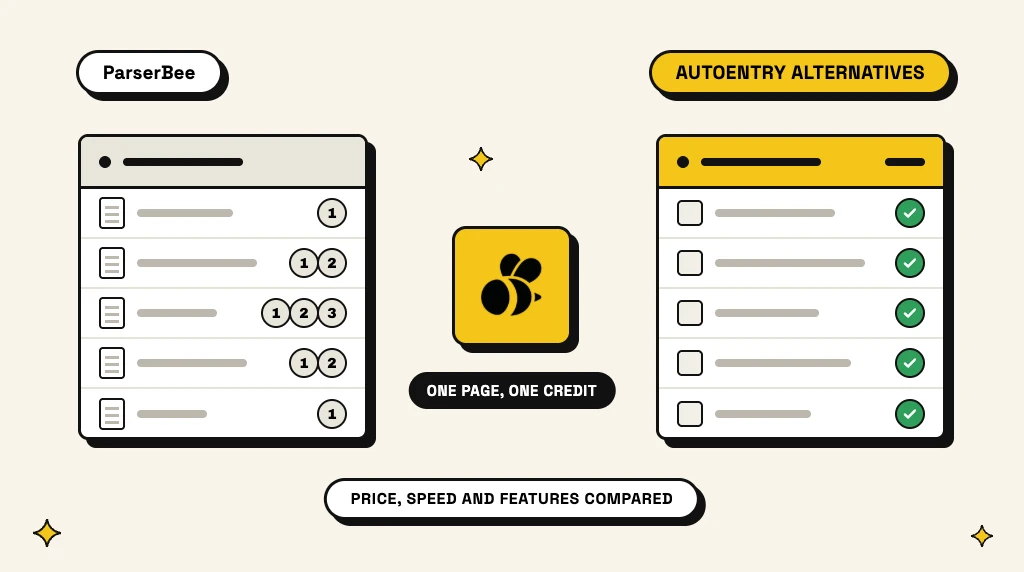
AutoEntry, owned by Sage, reads invoices, receipts and statements and publishes them into accounting software. It does that job well. But three things send people looking for an AutoEntry alternative: line items cost double, every bank statement page costs three credits, and results can take hours to come back.
This guide compares the four AutoEntry alternatives worth a look in 2026, with prices in dollars and pounds. Then it goes deep on the one we know best, ParserBee, with a full cost breakdown against AutoEntry. Every AutoEntry fact comes from autoentry.com or AutoEntry's own help centre, and every other price from the vendor's own site, all checked on 30 October 2026. We build ParserBee, so we have tried to be fair: where another tool is the better choice, this guide says so.
In short: ParserBee is the best AutoEntry alternative for most teams: line items at no extra cost, bank statements at one page credit per page, results in seconds, and any document type into Excel, Google Sheets or your other apps. Dext is the closest like-for-like swap if you want coded invoices published into your ledger. Xero's built-in capture is enough if you only post receipts and bills into Xero.
In this guide:
- Why people look for an AutoEntry alternative
- The best AutoEntry alternatives at a glance
- ParserBee: best overall AutoEntry alternative
- Dext: closest like-for-like replacement
- Datamolino: pay as you go for practices
- Hubdoc and Xero's built-in capture: the low-cost option
- ParserBee vs AutoEntry pricing, with worked examples
- ParserBee vs AutoEntry: extraction, speed, file types and integrations
- What you give up when you leave AutoEntry
- How to choose
- Frequently asked questions
Why people look for an AutoEntry alternative
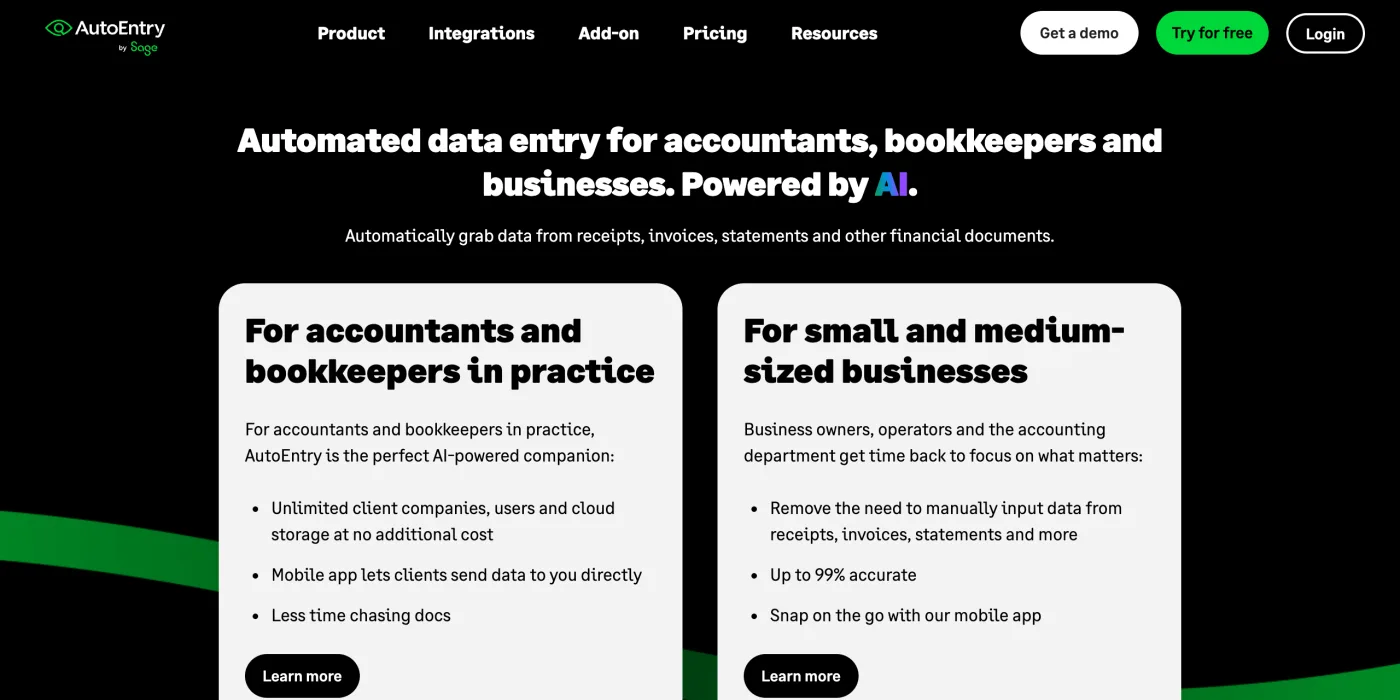
AutoEntry is built for accountants, bookkeepers and the small businesses they serve. Its workflow is capture, categorise, publish: snap or upload a document, let AutoEntry suggest the VAT code and category, then send the transaction to Sage, Xero, QuickBooks or one of nine other accounting packages.
The reasons people outgrow it are all in AutoEntry's own pricing page and help centre:
- Line items cost double. An invoice costs 1 credit for the totals and 2 credits with every line.
- Bank statements are expensive. Every page costs 3 credits, including cover pages, summaries and notes.
- Results take time. AutoEntry processes 80% of invoices in 10 to 120 minutes and 80% of bank statements in 30 to 240 minutes. Large batches can take more than 24 hours.
- Fixed document types. It reads purchase and sales invoices, receipts and expenses, credit notes, supplier statements, and bank and card statements. Purchase orders, delivery notes, freight paperwork and forms are out of scope.
- Strict file rules. PNG files, CSV files and saved emails are rejected, and it reads one invoice or receipt per page.
- Mainly English. AutoEntry calls itself an English-language program. It reads other languages "if the layout is clear" but does not guarantee accuracy, and rejected foreign-language invoices are not refunded.
- Closed outputs. Data goes to the ledger or to a CSV or Excel download. We found no public API or Zapier app.
The best AutoEntry alternatives at a glance
| Tool | Best for | Starting price | Line items | Bank statements | Speed |
|---|---|---|---|---|---|
| ParserBee | Line items, bank statements and any document, into spreadsheets and apps | $29 a month for 250 pages | Included | 1 page credit per page | Seconds |
| Dext | Coded receipts and invoices published to the ledger | £24.17 a month, billed annually, for 250 documents | Paid add-on | Paid add-on | Not stated |
| Datamolino | Accounting practices that want pay-as-you-go | £17 a month for 100 documents | Option at upload | £0.70 a page (business plans) | Not stated |
| Hubdoc / Xero capture | Low-cost bill and receipt capture into Xero or QuickBooks | Included in Xero plans (from £18 a month), or $12 a month on its own | Not listed | Key details only | Under 20 seconds (Xero) |
| AutoEntry (for reference) | Coded transactions published to 12 ledgers | $13 (£15.45) a month for 50 credits | 2 credits an invoice | 3 credits a page | 10 minutes to 4 hours |
1. ParserBee: best overall AutoEntry alternative
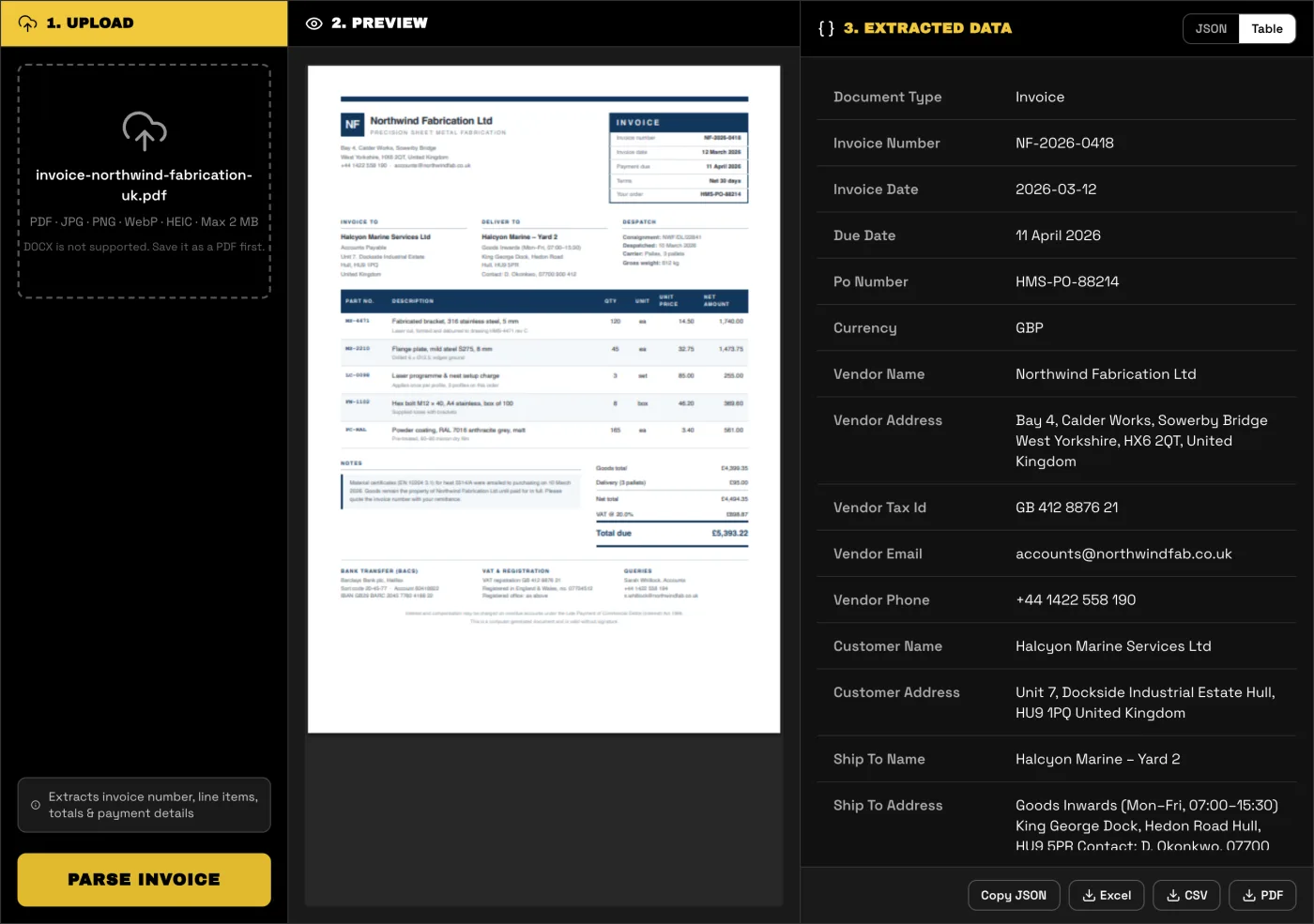
ParserBee is a document parser. You tell it which fields you want, and it reads them from every document you upload, whatever the supplier's layout. The set of fields is called a Parser Template. You can pick one of more than 80 ready-made templates (invoice, purchase order, bank statement, bill of lading, receipt and more) or upload one sample and let the AI template builder suggest the fields in about 20 seconds.
Then you run documents through it in three ways:
- Data Lab: drop up to 100 files in one batch and download one combined spreadsheet, with a row for each line item.
- Linked destinations: link a Parser Template to a Google Sheet or an Airtable table, and every document you run lands there as new rows.
- Automations and code: connect your inbox or storage through Zapier, Make or n8n, or call the REST API and MCP server.
Why it beats AutoEntry:
- Line items at no extra cost. One page credit per page, whether the invoice has 2 lines or 40.
- Bank statements at a third of the credits. 1 page credit per page against AutoEntry's 3.
- Results in seconds, not hours. A long bank statement takes about a minute.
- Any document type. Purchase orders, sales orders, bills of lading, remittance advices, delivery notes, contracts and forms work as well as invoices and receipts.
- Your own fields. Add, remove or rename any field and describe it in plain English. One Parser Template reads every supplier's layout.
- More input formats: PNG, WebP and HEIC photos, CSV files and saved emails, which AutoEntry rejects. It reads handwriting, and several receipts on one scan.
- Open outputs: Excel, CSV, PDF, Google Sheets and Airtable, plus Zapier, Make, n8n, a REST API with Python and Node.js libraries, and an MCP server.
- Try before you sign up. Free tools for invoices, purchase orders, bank statements, receipts, commercial invoices and bills of lading need no account.
- Your documents are never used to train AI.
Where AutoEntry still wins: ParserBee does not post to a ledger and does not suggest VAT codes; it reaches Xero and QuickBooks through Zapier, Make or n8n. It has no mobile app (phone photos upload from the browser), no email-in address of its own, and one login per account.
Pricing: free trial with 25 pages that never expire and no credit card; Starter $29 a month for 250 pages; Scale $99 for 1,500; Business $249 a month (or $2,499 a year) for 5,000. Every plan has every export and integration. The full cost comparison with AutoEntry is below.
Test your own invoice first
The free invoice parser reads one invoice, line items included, in seconds. No signup. Compare the result with what AutoEntry gives you today.
Open the free invoice parser → Or try the bank statement converter
2. Dext: closest like-for-like replacement
Dext (formerly Receipt Bank) does the same job as AutoEntry: capture receipts and invoices by app, email or upload, code them, and publish them into the ledger. It adds expense claims and approvals, supplier payments and a document vault.
- Pricing: business plans start at £24.17 a month, billed annually (£290 a year), excluding VAT, for 250 documents and 5 users.
- Line items, supplier statements and bank statements are add-ons. Line item extraction and supplier statement extraction start at £16.50 a month each, or £0.40 a document pay as you go. Bank statement extraction starts at £10 a month, or £0.25 a document. Each plan includes a few free credits for these.
- Free trial: 14 days.
- Choose it if you want AutoEntry's publish-to-ledger workflow and mainly process receipts and totals-only bills.
- Skip it if most of your invoices need line items or you process many bank statements: the add-ons add up, and ParserBee includes both in its page price.
3. Datamolino: pay as you go for practices
Datamolino is a smaller capture tool for bookkeepers and businesses that use Xero, QuickBooks Online or FreeAgent. It reads bills, receipts and bank statements, with a "totals only" or "include line items" option at upload.
- Business plans: Start £17 a month for 100 bills and receipts, Build £29 for 250, Grow £55 for 500 (extra documents £0.22 to £0.25 each). Bank statements cost £0.70 a page. One company per plan, unlimited users.
- Practice plans: a monthly minimum of £39, £135 or £500 that works as credit, then £0.16 to £0.26 per bill or receipt and £0.45 to £0.60 per bank statement page, with unlimited clients and users.
- Unused credit does not roll over. Free trial: 14 days.
- Choose it if you are a practice on Xero, QuickBooks Online or FreeAgent and want lower per-document prices than AutoEntry.
- Skip it if bank statements are a big part of your work, or you need documents beyond bills and receipts.
4. Hubdoc and Xero's built-in capture: the low-cost option
Hubdoc is owned by Xero, and inside Xero it now appears as the built-in Smart Document capture. Either way, it collects bills, receipts and invoices from a phone photo, an email address or an upload, reads the key details and records them with the document attached. Xero says it extracts a scanned document in under 20 seconds, then suggests matches with your bank transactions.
- Pricing for Xero users: included in every Xero UK small business plan at no extra cost. Xero plans start at £18 a month, excluding VAT.
- Pricing on its own: Hubdoc's own site lists $12 a month after a 30-day free trial, and it also syncs to QuickBooks Online.
- What it reads: the header details (supplier, date, amount, invoice number). We found no line-item extraction on either site.
- Choose it if you are on Xero (or QuickBooks) and only need bills and receipts recorded with their documents attached, at the lowest cost.
- Skip it if you need line items, spreadsheet output or anything beyond bills and receipts.
ParserBee vs AutoEntry pricing, with worked examples
The two tools price in different units, which makes a direct comparison tricky. AutoEntry charges credits per document, and the number of credits depends on the document type. ParserBee charges one page credit per page, whatever the document is.
AutoEntry plans
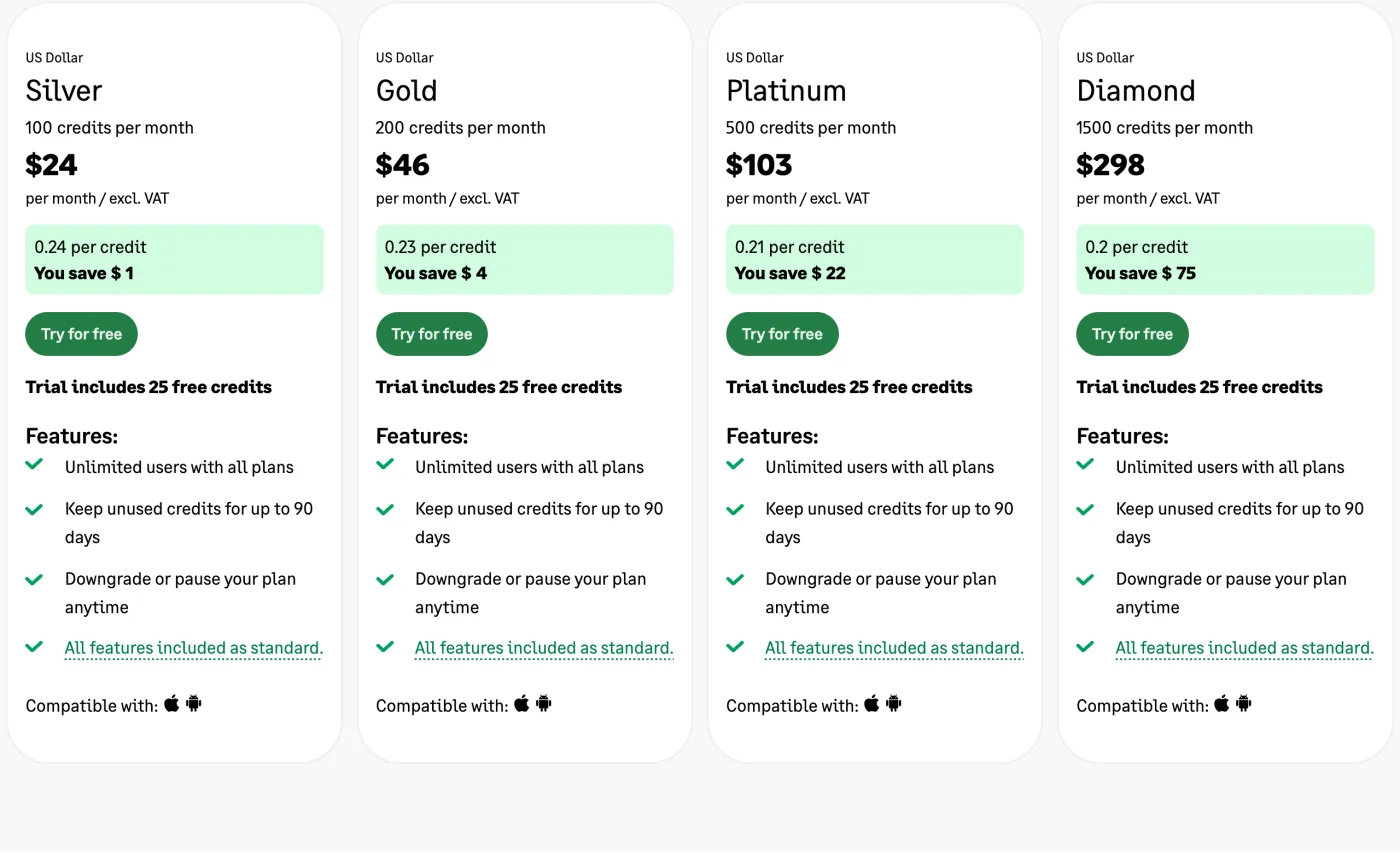
AutoEntry has six monthly plans. All features are on every plan; only the number of credits changes.
| Plan | Credits a month | USD a month | GBP a month | Price per credit (USD) |
|---|---|---|---|---|
| Bronze | 50 | $13 | £15.45 | $0.26 |
| Silver | 100 | $24 | £27.65 | $0.24 |
| Gold | 200 | $46 | £51.95 | $0.23 |
| Platinum | 500 | $103 | £119.35 | $0.21 |
| Diamond | 1,500 | $298 | £331.50 | $0.20 |
| Sapphire | 2,500 | $469 | £518.25 | $0.19 |
Prices exclude VAT. Above 2,500 credits a month, AutoEntry builds a custom package after a demo.
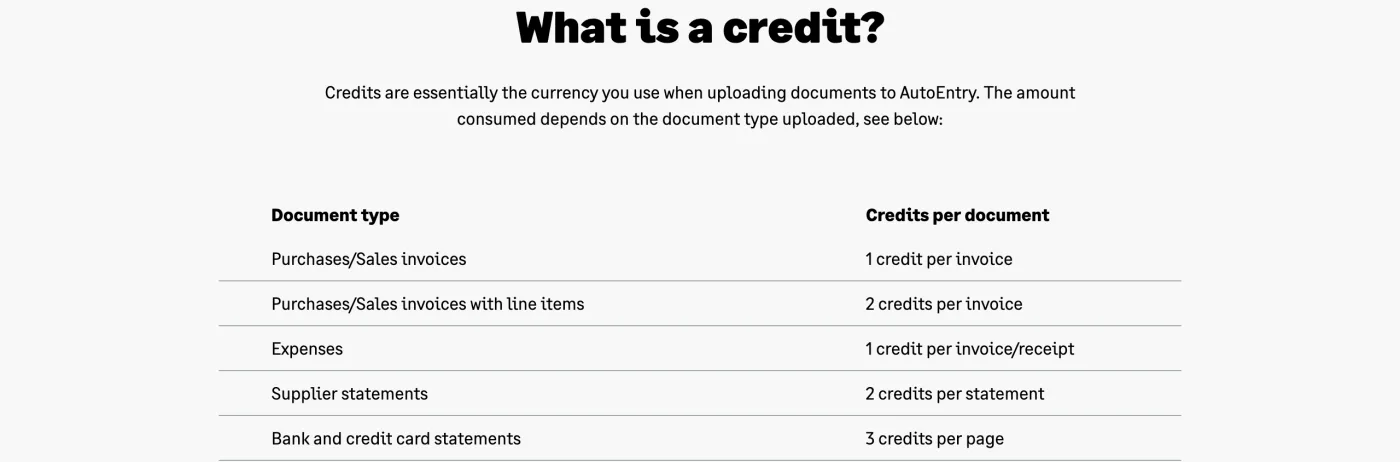
The credit cost of each document is where the real price sits:
Some details from AutoEntry's pricing FAQ and help centre that affect the final bill:
- Unused credits roll over for 90 days, and you can pause or downgrade a plan at any time.
- Overage is allowed but costs more. AutoEntry lets you go past your allowance and adds the extra credits to the next bill "at a higher pence per credit".
- Blank pages cost credits. Every bank statement page costs 3 credits, even cover pages, summaries and notes. AutoEntry suggests you remove those pages before uploading.
- Rejected invoices are not refunded. Rejected bank statements get their credits back; the help centre says this does not apply to invoice uploads.
- Card payment only. No PayPal or Direct Debit.
ParserBee plans
| Plan | Pages a month | Price | Price per page |
|---|---|---|---|
| Free trial | 25 in total, never expire | $0, no credit card | Free |
| Starter | 250 | $29 a month | $0.116 |
| Scale | 1,500 | $99 a month | $0.066 |
| Business | 5,000 | $249 a month, or $2,499 a year | $0.050 or less |
Every plan, the trial included, has every export and integration: Excel, CSV, PDF, Google Sheets, Airtable, Zapier, Make, n8n and the API. A page is a page, so an invoice with 40 line items costs the same as one with 2. Monthly pages reset at each renewal and do not roll over; extra page credits you buy on a paid plan never expire. Full details are on the pricing page.
Worked examples
Here is what five realistic workloads cost on each tool, using the smallest plan that covers each one (no rollover, no overage). We assume one-page invoices unless we say otherwise.
| Monthly workload | AutoEntry credits | AutoEntry plan | ParserBee pages | ParserBee plan |
|---|---|---|---|---|
| 40 invoices, totals only | 40 | Bronze, $13 (£15.45) | 40 | Starter, $29 |
| 100 invoices with line items | 200 | Gold, $46 (£51.95) | 100 | Starter, $29 |
| 150 invoices with line items and 60 bank statement pages | 480 | Platinum, $103 (£119.35) | 210 | Starter, $29 |
| 500 invoices with line items and 150 bank statement pages | 1,450 | Diamond, $298 (£331.50) | 650 | Scale, $99 |
| 100 three-page invoices with line items | 200 | Gold, $46 (£51.95) | 300 | Scale, $99 |
So who wins on price?
- ParserBee is cheaper as soon as you need line items or bank statements. One page of bank statement costs 3 AutoEntry credits, between $0.57 and $0.78 depending on the plan. On ParserBee the same page costs between $0.05 and $0.12.
- AutoEntry is cheaper for a small number of invoices where you only need the totals, and for long invoices, because it charges per document while ParserBee charges per page.
If your work is mostly bank statements, the gap is large. A bookkeeper converting 300 statement pages a month needs 900 AutoEntry credits (Diamond, $298) or 300 ParserBee pages (Scale, $99).
Run your line items and statements for free
Start with 25 free pages that never expire, no credit card. Line items and bank statement pages cost one page credit per page.
ParserBee vs AutoEntry: extraction, speed, file types and integrations
What each tool extracts
AutoEntry extracts a fixed set of fields per document type, chosen for bookkeeping. For an invoice, the minimum it needs is a transaction date and a total, and it also reads the supplier name, invoice number, net and VAT amounts. With line items turned on, it adds each line's description, unit price, quantity, net and VAT. Line items are off by default; you turn them on per upload, per company or per supplier. For bank statements it captures the account number, date, description, debit, credit, balance and cheque number.
ParserBee extracts the fields you ask for. The ready-made invoice Parser Template already reads the invoice number, dates, PO number, currency, supplier and customer details, tax IDs, every line item, shipping, tax, totals, payment terms and bank details. If you need something else (a project code, a delivery note number, the carrier on a freight invoice), you add a field and describe it in plain English. The same works for documents AutoEntry does not read at all: purchase orders, sales orders, bills of lading, remittance advices, delivery notes, contracts and forms.
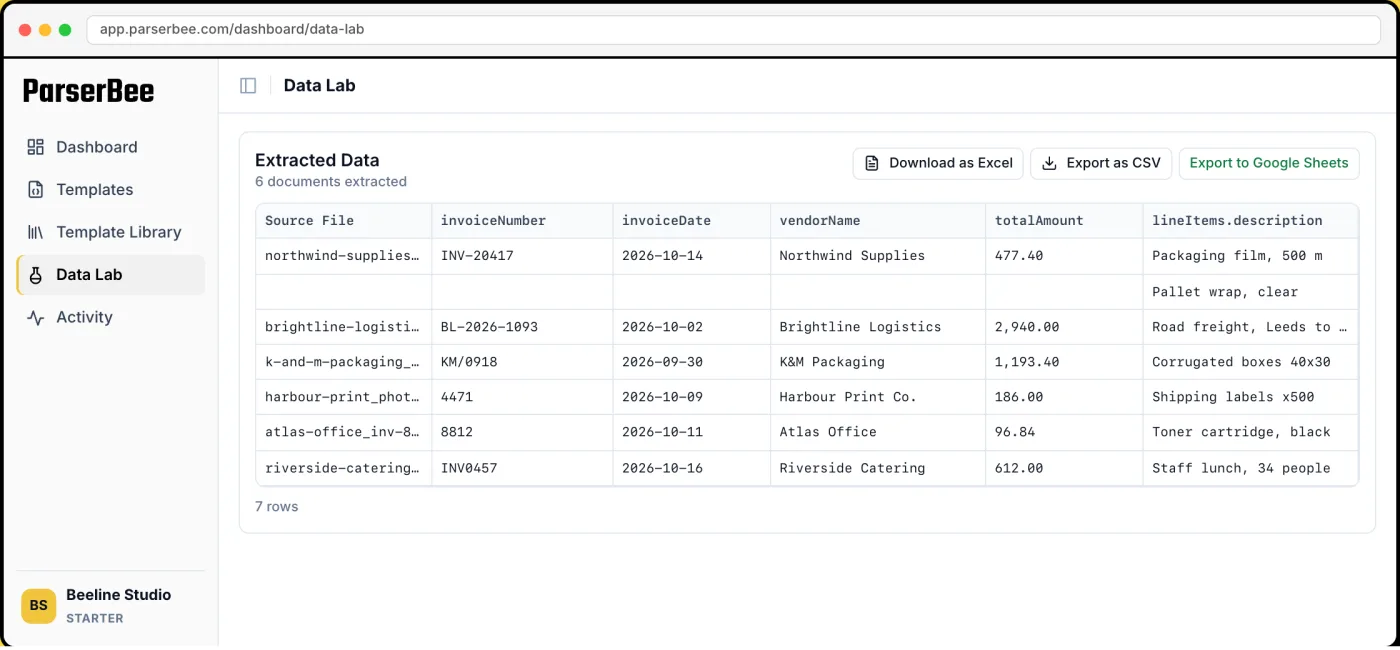
AutoEntry reads one invoice or receipt per page and asks you not to put several receipts on one image. ParserBee can be set up to read a list of records from one page, such as several receipts on one scan or every transaction in a statement.
Processing time
This is the biggest practical difference. AutoEntry's help article on processing times gives these figures:
| Document | AutoEntry: 80% are ready within |
|---|---|
| Purchase and sales invoices, expenses, supplier statements | 10 to 120 minutes |
| Bank statements | 30 to 240 minutes |
| Large batches, Word and Excel files | Can take more than 24 hours |
AutoEntry says most documents finish at the low end of those ranges, and that an invoice processed within 2 hours is within its standard timeframe. It also advises waiting up to 24 hours before contacting support about a document still in processing.
ParserBee returns each document in seconds. A long bank statement takes about a minute. In Data Lab, rows appear as each file finishes, so you can check the first results while the rest of the batch is still being read.
If you publish to your ledger once a week, a two-hour wait may not matter. If a supplier is on the phone, or an order has to be keyed today, it does.
See the speed difference on your own files
Upload a month of invoices or bank statements to Data Lab and watch the rows fill in as each file is read. 25 free pages that never expire, no credit card.
File types and document rules
| AutoEntry | ParserBee | |
|---|---|---|
| Yes, up to 199 pages a file | Yes, up to 24 pages a file on paid plans | |
| JPG / JPEG | Yes | Yes |
| PNG | No | Yes |
| WebP, HEIC (iPhone photos) | Not listed | Yes |
| TIFF | Yes | No |
| Word | .doc and .docx (slower) | .doc only, not .docx |
| Excel | .xlsx, one invoice per file (slower) | .xlsx |
| CSV | No | Yes |
| Saved emails (.eml) | No | Yes |
| Password-protected PDFs | No | No |
| Several receipts on one page | No | Yes, with a list field |
| Handwriting | Warns against pen marks | Reads handwritten forms and notes |
AutoEntry also rejects a file that does not look like an invoice, supplier statement or bank statement, or that lacks a date and a total. Arabic and Chinese or Japanese style fonts are rejected outright.
Integrations and where the data goes
AutoEntry is built to publish. It connects to 12 accounting packages (Sage, Xero, QuickBooks, FreeAgent, KashFlow, Clear Books, MYOB AccountRight, Reckon One, AccountsIQ, SortMyBooks, FuseMetrix and Exact), pulls in your chart of accounts and VAT codes, and posts the coded transaction with the document attached. Outside the ledger, you can download CSV or Excel files.
ParserBee is built to hand data to whatever you use next:
- Excel, CSV and PDF downloads from Data Lab, one row per line item.
- Google Sheets and Airtable, either as a one-click export or as a linked sheet or table that fills itself.
- Zapier, Make and n8n, to pick up email attachments or new files in Google Drive and send the results on: to Xero, QuickBooks, a CRM, an ERP or a Slack message.
- REST API, with Python and Node.js libraries, and an MCP server for AI assistants.
AutoEntry goes deeper into accounting software; ParserBee goes wider. If your destination is Xero or QuickBooks, AutoEntry gets there in one click with the coding done. ParserBee needs a Zapier, Make or n8n step and leaves the coding to you or your accounting rules.
What you give up when you leave AutoEntry
To be fair to AutoEntry, these are real strengths. Dext and Datamolino match some of them; ParserBee does not match them today:
- Native publishing to 12 accounting packages, with VAT code, category and supplier suggestions that learn from your corrections.
- A mobile app for iPhone and Android, so clients can photograph receipts on the go.
- A personal email address for forwarding PDFs into the account. (ParserBee does this through a Zapier, Make or n8n inbox automation instead.)
- Unlimited users, client companies and cloud storage, plus a partner portal for practices.
- Bookkeeping features: supplier statement reconciliation, duplicate flagging, marking invoices as paid, re-billable expenses, mileage and expense claims with multi-level approval, and purchase order matching for QuickBooks and Xero.
- Credits that roll over for 90 days, and plans you can pause.
- A lower entry price, at $13 or £15.45 a month.
How to choose
Choose ParserBee if:
- You need line items on most invoices, or you convert bank statements in volume. This is where ParserBee costs a fraction of AutoEntry.
- You need the data in Excel, Google Sheets, Airtable, a CRM or an ERP, not only in the ledger.
- You handle documents beyond invoices and receipts: purchase orders, freight paperwork, remittances, forms.
- You need results in seconds, or you want to build your own automation with Zapier, Make, n8n or the API.
- You receive PNG screenshots, iPhone photos, CSV files or forwarded emails.
Choose Dext if you want AutoEntry's capture, code and publish workflow with expense approvals, and most of your documents are receipts and totals-only bills.
Choose Datamolino if you are a practice on Xero, QuickBooks Online or FreeAgent and want pay-as-you-go pricing per document.
Choose Hubdoc or Xero's built-in capture if you only need bills and receipts recorded in Xero or QuickBooks with the document attached, at the lowest cost.
Stay with AutoEntry if you rely on its publishing, VAT coding and unlimited client companies, mostly need invoice totals, and its processing times suit you.
Use two tools if you run a practice that publishes invoices through a ledger tool but also converts stacks of bank statements or non-invoice documents for clients. Sending the bank statements through ParserBee instead of spending 3 AutoEntry credits a page on them often pays for the second tool on its own.
Whichever way you lean, test with your own worst documents: a blurry receipt photo, a three-page invoice, a scanned statement. For a wider view of the market, see our guide to the best invoice OCR software and our round-up of bank statement to Excel software.
Try the AutoEntry alternative built for line items and statements
Every invoice line and every statement transaction costs one page credit per page, with results in seconds. Start with 25 free pages that never expire, and no credit card.
Frequently asked questions
What is the best AutoEntry alternative?
For most teams, ParserBee. It reads invoices with every line item and bank statements at one page credit per page, returns results in seconds instead of hours, and works with any document type, not only invoices and receipts. If you need invoices coded and published straight into your ledger, Dext is the closest like-for-like replacement, and Xero users can start with Xero's built-in document capture.
Is there a free AutoEntry alternative?
Xero includes its Smart Document capture in every UK small business plan at no extra cost, so Xero users already have a basic one. It reads receipts and bills into Xero only. ParserBee gives every new account 25 free pages that never expire, and its free invoice parser, bank statement converter and receipt scanner need no signup at all.
How much does AutoEntry cost?
AutoEntry sells monthly credit bundles. In US dollars, Bronze is $13 for 50 credits, Silver $24 for 100, Gold $46 for 200, Platinum $103 for 500, Diamond $298 for 1,500 and Sapphire $469 for 2,500. In pounds the same plans are £15.45, £27.65, £51.95, £119.35, £331.50 and £518.25. All prices exclude VAT. Prices checked on autoentry.com on 30 October 2026.
What is a credit in AutoEntry?
A credit is what AutoEntry charges per document. An invoice with totals only costs 1 credit, an invoice with line items costs 2, an expense receipt costs 1, a supplier statement costs 2, and every page of a bank or credit card statement costs 3. Unused credits roll over for 90 days.
AutoEntry vs Dext: which is better?
Both read receipts and invoices and publish them to accounting software such as Xero and QuickBooks. AutoEntry includes line items, supplier statements and bank statements in its credit price and has unlimited users on every plan. Dext's business plans start at £24.17 a month (billed annually) for 250 documents and 5 users, and charge for line items, supplier statements and bank statements as add-ons. If you mainly need line items and bank statements in a spreadsheet, ParserBee is cheaper than either.
How long does AutoEntry take to process an invoice?
AutoEntry's help centre says it processes 80% of invoices, expenses and supplier statements within 10 to 120 minutes, and 80% of bank statements within 30 to 240 minutes. Large batches, Word files and Excel files can take up to 24 hours. ParserBee returns results in seconds per document, and about a minute for a long bank statement.
Does AutoEntry have an API or a Zapier integration?
AutoEntry's website and help centre do not list a public API or a Zapier app. It sends data to accounting software through its own integrations, and you can download CSV or Excel files. ParserBee has a REST API, an MCP server, a Zapier app, ready-made n8n workflows and a Make set-up guide.
Can ParserBee send invoices to Xero or QuickBooks?
Not natively. ParserBee reaches Xero, QuickBooks and other accounting tools through Zapier, Make, n8n or its API. It does not suggest VAT codes or nominal codes, so the coding step stays with you or your accounting software's rules.