 Email PDF to OrderApp for Shopify by ParserBee
Your first B2B order in Shopify, in six steps.
From install to a draft order you can send. It takes about five minutes, and most of that is waiting for your first order to arrive.
Watch every step in a real store.
Install the app and open it.
Install Email PDF to Order from the Shopify App Store, then open it from Apps in your Shopify admin. There is no account to make and no password: the app sets itself up for your store on the first open.
Your first 5 orders are free, with no time limit, so you can try it on real orders before you choose a plan.
Copy your store's forwarding address.
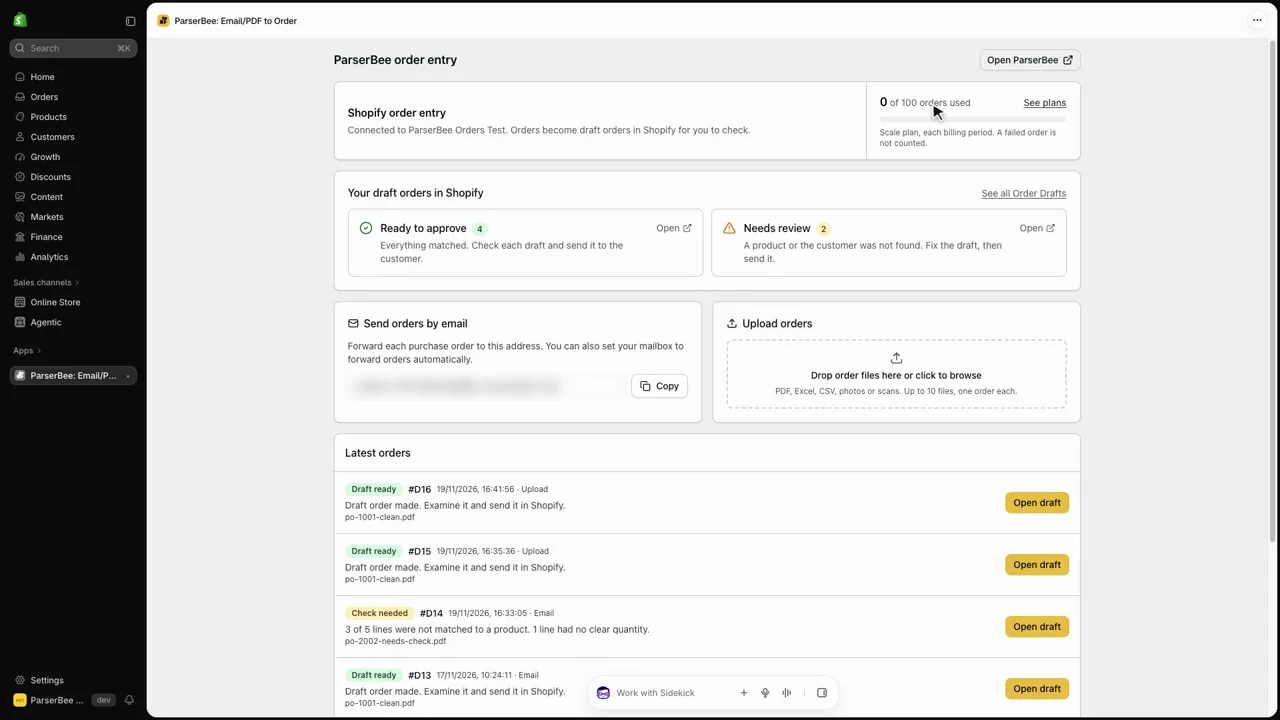
Under Send orders by email you find an address made for your store only. It starts with orders- and ends with @in.parserbee.com. Press Copy.
orders-k7m2p9xq4tbw@in.parserbee.comCopyForward a customer's order, or upload it.
Forward the email with the purchase order attached. The attachment can be a PDF, an Excel or CSV file, a scan or a phone photo. Orders typed straight into the email work too.
Or use Upload orders in the app: drop up to 10 files and press Make draft order. Each file is one order. Keep the page open; it can take one or two minutes.
Shopify Customer: buyer@example.com to your email, with the customer's email address, so the right customer goes on the draft.- From
- Maya Ortiz <purchasing@harborhome.co>
- Subject
- Purchase order PO-30418
Wait a minute or two for the email.
The app reads the order, finds the customer, matches every line to a product in your store and makes a draft order. Then it emails you one of two things:
- Draft order #D13 is ready when everything matched.
- Draft order #D14 needs your check when a line or the customer needs a look.
Open the draft in Shopify and check it.
In the app, Ready to approve and Needs review open your Shopify drafts already filtered. On a draft that needs review:
- Replace any line that starts with
NOT MATCHEDwith the right product. It shows the description and price from the customer's document. - Read the note: it names the file, the requested delivery date, the buyer's notes and anything to check, such as a line with no clear quantity.
- If the tag
ParserBee-Customer-Not-Foundis there, add the customer. The note names the buyer.
Matched lines already have your store's prices. Prices printed on the purchase order are ignored.
Send the order the way you always do.
The draft is a normal Shopify draft order. Send the invoice, take payment or create the order, as you would for an order you typed yourself. Nothing reaches your customer until you do.
Next: read how product matching works, or see the FAQ.