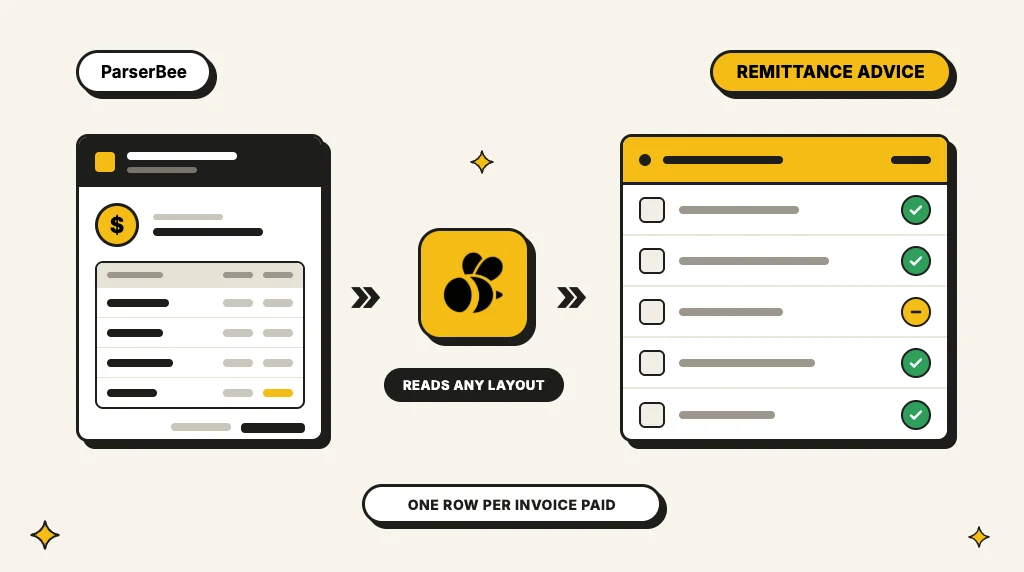
A payment of $8,412.50 lands in your bank account. The reference says "NWS PAY 004417". Which invoices does it pay? Three of them, it turns out, minus a credit note, and the only place that says so is a PDF in someone's inbox. That PDF is the remittance advice.
This guide explains what a remittance advice is, what it contains, how it differs from an invoice and a receipt, and what a supplier does with it. It includes a worked example and a template you can copy. We build ParserBee, a document parser that finance teams use to read remittance advices into spreadsheets, so the last section shows how that works too.
In short: a remittance advice is a note a customer sends a supplier to say a payment has been made and which invoices it covers. It lists the payment date, amount and reference, then each invoice paid, with any deductions. The supplier uses it to match the money in the bank to open invoices, a job called cash application.
In this guide:
- What is a remittance advice?
- What a remittance advice includes
- Remittance advice example
- Sample remittance advices you can download
- Remittance advice vs invoice, receipt and statement
- Types of remittance advice
- Remittance advice template
- What suppliers do with a remittance advice
- How to read remittance advices automatically
- FAQ
What is a remittance advice?
A remittance advice is a document a payer sends to a payee to say that a payment has been made and what it is for. "Remittance" means money sent to someone; the "advice" is the notice that goes with it. You will also see it called a remittance slip, payment advice, remittance note or simply "the remittance".
Most remittance advices come from a customer's accounts payable (AP) team. When the customer pays a batch of supplier invoices, their accounting system sends each supplier an email with a PDF that lists the invoices in that payment. The supplier's accounts receivable (AR) team then uses it to mark those invoices as paid.
Why is it needed at all? Because a bank payment carries very little information. A transfer reference has room for a few characters, so it rarely holds more than one invoice number, and often holds none. When one payment covers ten invoices, or covers them only in part, the bank statement cannot tell the supplier what happened. The remittance advice can.
The same idea appears outside business-to-business payments:
- Healthcare: insurers send providers a remittance advice (RA, or ERA when electronic) that explains each claim payment, with adjustments and reason codes.
- Government and large employers: state agencies and big organisations send vendors a remittance advice with each payment, often as a stub attached to a check or a page in a supplier portal.
- Payroll: some employers call the payslip a "remittance advice", because it explains the net pay that was sent.
This guide focuses on the business case, a customer paying a supplier, because that is where most remittance advices are sent and where they cause the most work.
What a remittance advice includes
There is no fixed format. Every customer's AP system produces its own layout. But almost every remittance advice carries the same two kinds of information: details of the payment, and a list of what it pays.
Payment details (once per remittance):
- Payer: the customer's company name, and often their address and a contact email
- Payee: your company name, and sometimes the supplier or vendor number the customer uses for you
- Payment date: the date the payment was sent or scheduled
- Payment method: bank transfer (ACH, BACS, SEPA, wire), check or card
- Payment reference: the reference that will appear on your bank statement, or the check number
- Total amount paid and the currency
- Bank details: sometimes the last digits of the account the money was sent to
Payment lines (one per document):
- Invoice number (your number, as you wrote it on the invoice)
- Invoice date
- Customer reference: often their PO number or their own document number
- Invoice amount: the original gross amount
- Discount taken: an early payment discount, if any
- Deduction or adjustment: a credit note, a short payment, a withholding tax or a disputed amount, ideally with a reason
- Amount paid: what was actually paid against this line
The lines are the part that matters. A remittance that says "we paid $8,412.50" without the lines does not help anyone match the money.
Remittance advice example
Here is a typical remittance advice, as a customer's AP system would send it. Northwind Supplies is paying three invoices to Brightline Packaging, minus a credit note for damaged goods.
Payment details
| Field | Value |
|---|---|
| Payer | Northwind Supplies Ltd |
| Payee | Brightline Packaging Inc. (vendor no. V-20391) |
| Payment date | 24 October 2026 |
| Payment method | ACH transfer |
| Payment reference | NWS PAY 004417 |
| Total paid | USD 8,412.50 |
Documents paid
| Document | Date | Your reference | Gross amount | Deduction | Paid |
|---|---|---|---|---|---|
| INV-20417 | 12 Sep 2026 | PO 55102 | 3,240.00 | 0.00 | 3,240.00 |
| INV-20488 | 19 Sep 2026 | PO 55187 | 4,180.00 | 83.60 (2% early pay) | 4,096.40 |
| INV-20502 | 26 Sep 2026 | PO 55231 | 1,436.10 | 0.00 | 1,436.10 |
| CN-0091 | 2 Oct 2026 | Damaged pallet | -360.00 | 0.00 | -360.00 |
| Total | 8,496.10 | 83.60 | 8,412.50 |
Read it the way an AR clerk would. The $8,412.50 on the bank statement is explained in full: three invoices paid, one with a 2% early payment discount, and a credit note netted off. Without this page, the clerk would see a payment that matches no single invoice and would have to call the customer to find out what it covers.
Get remittance lines into a spreadsheet
Upload one remittance advice and ParserBee builds the fields for you, invoice lines included. Then every customer's layout lands in the same columns. 25 free pages, no credit card.
Try it on your remittances → Or see how cash application automation works
Sample remittance advices you can download
The example above is made up. To see real layouts, or to test a parser on more than one design, start with these free PDFs. Each one comes from the issuer's own website.
| Sample | Source | What it shows | Pages |
|---|---|---|---|
| Sample virtual payables remittance | Bank of America (US) | Two emailed remittances for card payments: two invoices on the first, and three invoices with early payment discounts and net amounts on the second | 2 |
| ACH payment remittance example | REPAY (US) | A blank vendor remittance for an ACH payment: payer, vendor, total paid, and an invoice table with gross amount, adjustments and net paid | 1 |
| Remittance advices, September 2025 | Washington County Treasurer, Colorado (US) | A real batch: one wire remittance per page, each listing the amounts paid to one district, with the treasurer's fee deducted | 29 |
| How to view your remittance advice | Washington State DSHS (US) | A healthcare remittance advice explained section by section: paid, denied, adjusted and in-process claims | 12 |
| Remittance Advice Resources and FAQs | CMS Medicare Learning Network (US) | How to read Medicare institutional and professional remittance advices, and how the electronic version (ERA) relates to them | 15 |
The first three are business payments, the kind an AR team receives. The last two are healthcare guides with sample pages, useful if you work in medical billing.
To test ParserBee on one, upload it as the sample in the AI template builder. ParserBee reads one remittance per file, so split the county batch into single pages first.
Remittance advice vs invoice, receipt and statement
These four documents get mixed up because they all talk about the same money. The difference is who sends each one and when.
| Document | Who sends it | When | What it says |
|---|---|---|---|
| Invoice | Supplier to customer | After goods or services are delivered | "You owe us this amount by this date." |
| Remittance advice | Customer to supplier | When the payment is sent | "We have paid you this amount, and it covers these invoices." |
| Receipt | Supplier to customer | After the payment arrives | "We received your payment." |
| Customer statement | Supplier to customer | Usually monthly | "Here is everything you owe us, and what you have paid." |
Two points cause the most confusion:
- A remittance advice is not a receipt. It comes from the payer, before the payee has confirmed anything. It can even arrive before the money does.
- A remittance advice is not proof of payment. A payment can be recalled, fail or arrive short. Your bank statement is the proof; the remittance advice explains what the payment is for. Always match the two.
Types of remittance advice
Remittance advices reach suppliers in several forms. Most AR teams receive all of them, often from the same customer list.
PDF attached to an email. The most common form. The customer's AP system emails a PDF to the address on file, often a shared inbox such as accounts@ or ar@. Each customer's system has its own layout.
Text in the email body. Smaller customers often type the remittance into an email: "Paid INV-20417 and INV-20488 today, total $7,336.40." There is no attachment to open, just text to read.
Supplier portal download. Large customers often send no email at all. The remittance waits in their supplier portal, and someone on your team logs in to download it.
Remittance slip or check stub. When a customer pays by check, the remittance advice is the stub attached to the check or a slip in the same envelope. It often arrives as paper and gets scanned.
EDI 820. Between trading partners with EDI, the 820 Payment Order/Remittance Advice message carries the same information as structured data, ready for a system to read.
Electronic remittance advice (ERA, X12 835). In US healthcare, insurers send providers the 835 file, which explains each claim payment line by line with standard adjustment codes.
The structured forms (EDI 820 and the 835) are easy for software. The PDFs, emails, portal downloads and scanned stubs are where the manual work is, and for most small and mid-size suppliers they are the majority.
Remittance advice template
If you pay suppliers and want to send a remittance advice, this is all it needs. Copy it into an email, a spreadsheet or your invoice tool. Your suppliers' AR team will thank you.
| Section | What to write |
|---|---|
| Title | Remittance advice |
| From | Your company name, address and an AP contact email |
| To | Supplier name and the supplier or vendor number you use for them |
| Payment date | The date you sent the payment |
| Payment method | ACH, BACS, SEPA, wire, check (with check number) or card |
| Payment reference | Exactly what will appear on their bank statement |
| Total paid | The amount and currency |
| Lines | One line per invoice or credit note: their document number, document date, gross amount, any discount or deduction with a reason, and the amount paid |
| Note | Who to contact with questions |
Three habits make a remittance advice far more useful to the supplier:
- Use the supplier's invoice number, not your internal voucher number. The supplier cannot look up your numbers.
- Explain every deduction. "Short paid $120: 2 cartons damaged, see claim 5521" saves an email thread. A bare $120 gap starts one.
- Make the payment reference match. Put the same reference on the payment and on the remittance advice, so the supplier can pair them in seconds.
What suppliers do with a remittance advice
For the supplier, the remittance advice is the key to a process called cash application: matching each incoming payment to the invoices it pays and marking them as paid in the accounting system.
Done by hand, it usually goes like this:
- Find the payment on the bank statement or in the bank feed.
- Find the remittance advice that explains it: in the AR inbox, a portal or the mail.
- Read the lines and type the invoice numbers and amounts into the accounting system, or tick them off in a spreadsheet of open invoices.
- Handle the differences: discounts, short payments, credit notes and invoice numbers that the customer typed wrong.
- Post the payment so the invoices close and the customer's balance is right.
Step 3 is the slow one. A large customer can pay 40 invoices in one transfer, and every customer's remittance looks different, so the clerk reads each layout by eye. Mistakes here are expensive: an invoice left open by error gets chased with an overdue reminder to a customer who has already paid it.
Unapplied cash also hides your real position. Until a payment is applied, your aged debtors report overstates what customers owe, and collections teams chase the wrong accounts.
How to read remittance advices automatically
The fix for step 3 is to stop reading remittance advices by eye. A document parser reads each one and gives you the payment details and every invoice line as rows, whatever the customer's layout. You then match those rows to your open invoices in a spreadsheet or import them into your accounting tool.
Here is how that works in ParserBee, with no code:
- Build a Parser Template from one sample. Sign up, click Create Template, choose Build it with AI and upload one remittance advice (PDF, PNG, JPG or WebP). In about 20 seconds the AI template builder proposes the fields: payer, payment date, payment reference, total paid, and a list of payment lines with invoice number, amount and deduction. Remove what you do not need, or add a field in plain English, such as "the reason for any deduction".
- Test it. Run the test on your sample and check the fields against the paper. The template now reads every customer's remittance, not only the one you uploaded, because the AI reads by meaning, not by position.
- Run the backlog in Data Lab. Drop in up to 100 remittances at once in Data Lab: PDFs, scanned check stubs, phone photos, and emails saved as .eml files. Each invoice line comes out as its own row, with the payment details on the first row of each remittance.
- Export or connect. Download Excel or CSV, or send the rows to a linked Google Sheet. In your sheet, a lookup on the invoice number marks each open invoice as paid, part paid or still open. For remittances that arrive every day, connect your AR inbox through Zapier, Make or n8n so each new attachment is read as it arrives.
ParserBee does the reading, not the posting: it has no bank feed and does not close invoices in your accounting system for you. QuickBooks, Xero and other systems are reached through Zapier, Make, n8n, a CSV import or the document parsing API. For the full set-up, see our page on cash application automation.
The bank statement side works the same way. If your bank only gives you PDF statements, the free bank statement converter turns them into rows, so both halves of the match sit in one spreadsheet.
Stop typing remittance lines
Build a remittance Parser Template from one sample, then read a whole month of remittances in one batch. 25 free pages that never expire, no credit card.
Frequently asked questions
What is a remittance advice in simple terms?
It is a note from the customer that says: we have paid you this amount, on this date, and here are the invoices it covers. It helps the supplier match the money that arrives in the bank to the right invoices.
Is a remittance advice the same as a receipt?
No. The payer sends a remittance advice to announce a payment. A receipt goes the other way: the supplier sends it to confirm that the money arrived. Many suppliers never send receipts for business payments; the bank statement is their proof.
Is a remittance advice proof of payment?
Not on its own. It says a payment was sent or scheduled, but the money can still fail or arrive late. Suppliers treat the bank statement as the proof and the remittance advice as the explanation of what the payment is for.
Can I cash a remittance advice check?
The remittance advice itself is not money. When a payment comes as a check, the remittance advice is the stub or slip attached to it, and only the check part can be deposited. If you received a stub with no check, the payment was probably sent by bank transfer; look for it on your bank statement.
Is a remittance advice a legal requirement?
Usually not. It is a business courtesy that most large companies send automatically from their accounts payable system. Some customers only send one when you ask, and some contracts require it, so check your customer agreements.
What is an electronic remittance advice (ERA)?
An electronic remittance advice is a remittance advice sent as structured data instead of a document. In US healthcare, an ERA is the X12 835 file an insurer sends to a provider to explain each claim payment, with adjustment and reason codes. In other industries, the EDI 820 message does the same job between trading partners.
What is a remittance advice in medical billing?
In medical billing, the remittance advice (RA, or ERA when electronic) is the insurer's statement that lists each claim it paid or denied, the amount allowed, the amount paid, adjustments and the reason codes. Billing staff use it to post payments to patient accounts and to find claims that need an appeal.
Who sends a remittance advice, and who receives it?
The payer sends it: the customer who pays an invoice, the insurer who pays a claim, or the employer or government body that pays a vendor. The payee receives it: usually the supplier's accounts receivable team, who use it to apply the cash to open invoices.
How do I read remittance advices automatically?
Use a document parser that reads every customer's layout. In ParserBee, upload one remittance advice and the AI template builder builds the fields in about 20 seconds. Then run the rest in Data Lab or connect your inbox through Zapier, Make or n8n, and export the invoice lines to Excel or Google Sheets. See cash application automation for the full set-up.
Keep reading: