As part of the latest release of ParserBee, we are introducing the Template Library: a built-in collection of 83 ready-made document extraction templates covering 16 industries. The purpose of the library is to remove the blank-page problem. Instead of starting from an empty form and deciding field by field what to pull from your documents, you now start from a template that someone has already thought through, and tweak it to fit.
A template is the heart of every ParserBee workflow: it is the list of fields you want pulled out of each document (things like vendor name, invoice total, or candidate email). Writing a good one from scratch is not hard, but it does take a little thought, and it was the single biggest speed bump between signing up and getting your first clean extraction. The library turns that step from “design something” into “pick something.” You will find it in the dashboard sidebar, and it is now the recommended path whenever you create a new template.
Template Library Features
Here is what is inside the library:
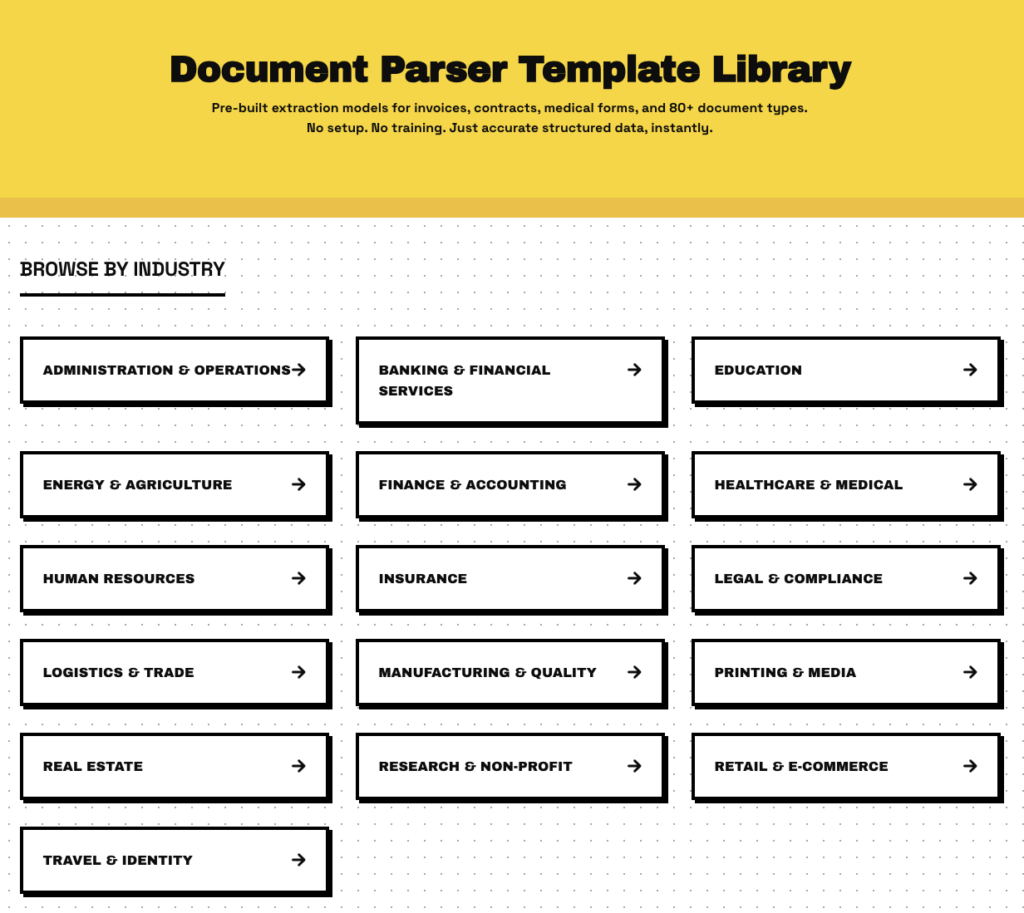
- 83 templates across 16 industries: Finance & Accounting, Human Resources, Legal & Compliance, Administration & Operations, Healthcare & Medical, Insurance, Logistics & Trade, Manufacturing & Quality, Banking & Financial Services, Real Estate, Retail & E-Commerce, Travel & Identity, Education, Energy & Agriculture, Research & Non-Profit, and Printing & Media. Whatever documents land on your desk, there is almost certainly a starting point here.
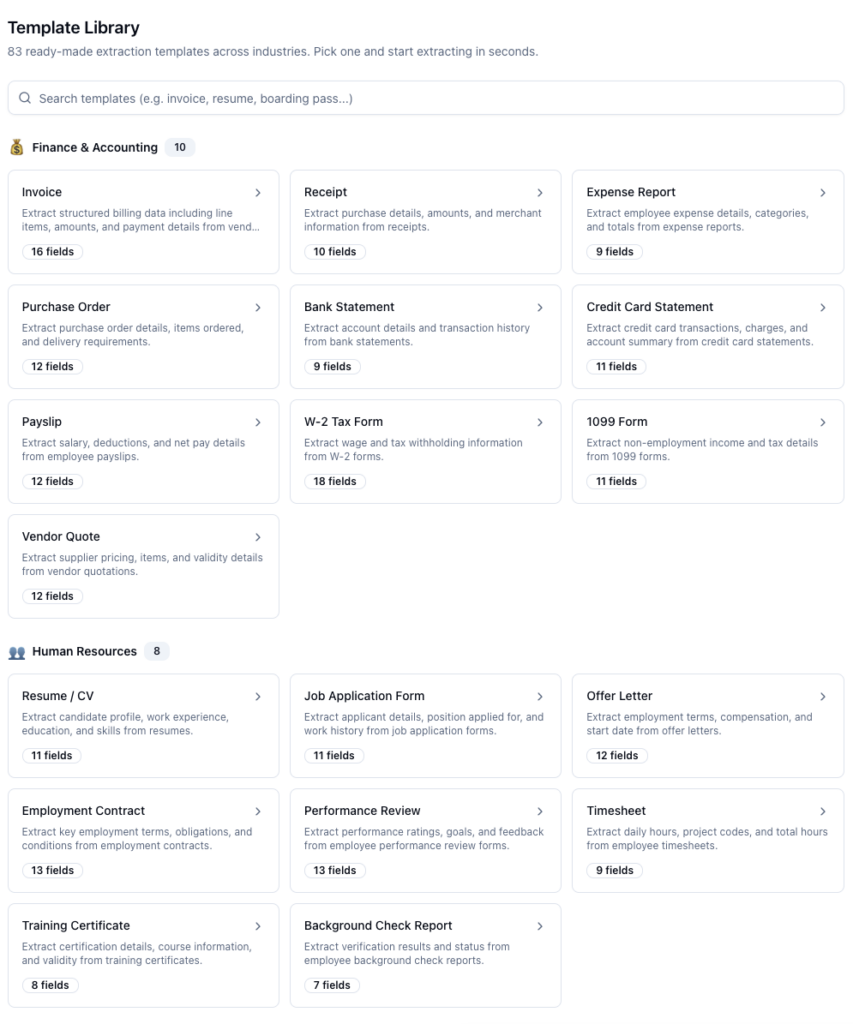
- Live search: One search box filters the whole library as you type, matching template names, industries, and descriptions. Type “invoice” or “resume” and the list narrows instantly.
- Browse by industry: Templates are grouped under their industry headings, so you can also just scroll your section and see everything relevant to your field in one place.
- Field preview before you commit: Every template card shows how many fields it extracts, and clicking through to its detail page shows you each field by name and type before you decide to use it.
- Multi-record badges: Some documents contain many records in one file (think a bank statement full of transactions). Templates built for those are marked with a “Multi-record” badge, so you know each document will come out as multiple rows rather than one.
- Customize & Create: One button on any template’s detail page opens the template editor pre-filled with all of that template’s fields. Nothing is locked: rename fields, delete the ones you do not need, add your own, then save it as your own template.
How to Use the Template Library
Your first template can be ready in under two minutes:
- Log in to your ParserBee dashboard
- Click Template Library in the sidebar
- Search or scroll to a template that matches your document
- Open it and review the fields it extracts
- Click Customize & Create, adjust anything you like, and save
From here, you can:
- Test the saved template on a real document straight from its detail page
- Click Bulk Extract with Data Lab to run a whole batch of documents through it
- Use the template with the ParserBee API or automation tools like Zapier, n8n, and Make
- Come back and edit the template any time; it is yours now, not the library’s
The library is also wired into the template creation flow itself. Whenever you click Create Template anywhere in the dashboard, you get a choice: start from scratch, or pick a ready-made template (marked “Recommended”). Blank-page builders are not going anywhere, but most people should never need one again.
Templates Are Starting Points, Not Contracts
The most important design decision in the library is that nothing is take-it-or-leave-it. “Customize & Create” opens the ready-made template in the exact same editor you would use to build one from scratch, with every field already filled in and fully editable.
That matters because no two businesses have identical documents. Maybe your invoices have a project code that our invoice template does not know about, or your intake form has three fields you never use. Start from the library template, add the project code field, delete the noise, and save. You get the ten minutes of thinking for free and spend thirty seconds on the parts that are actually specific to you.
And because a saved library template is just a normal template, everything else in ParserBee works with it immediately: single-document tests, Data Lab batches, CSV and Google Sheets exports, and the API.
Use Cases for Document Extraction Templates
Here are some ways different teams can put the library to work:
Finance Teams Standardizing Data Entry
Instead of every bookkeeper deciding which invoice fields matter, pick the ready-made invoice template once, adjust it to your chart of accounts, and share one consistent extraction format across the whole team. The Finance & Accounting and Banking & Financial Services sections cover the everyday paper of a finance desk.
HR Without the Setup Meeting
Recruiters can grab a resume template, tweak the fields to match their tracking spreadsheet, and start screening candidates the same afternoon. The Human Resources section covers common hiring and people-ops documents, so there is no “phase one: requirements workshop.”
Regulated Industries That Cannot Improvise
Healthcare, insurance, and legal teams often know exactly which fields they must capture, because a regulation or a policy says so. Starting from a template built for their document type means the obvious required fields are already present, and reviewers only need to check what is missing rather than build the list from memory.
Trying ParserBee in Your First Five Minutes
If you are evaluating ParserBee on a free trial, the library is the fastest possible proof. Pick the template that matches a document you have on hand, save it unchanged, and run one extraction. You will know within minutes whether this fits your workflow, before you have invested any setup effort at all.
The library of document extraction templates can be helpful in a range of ways for a range of teams. Whether you are standardizing a finance workflow, screening candidates, meeting a compliance checklist, or just kicking the tires, it replaces the hardest part of getting started with a two-minute pick-and-tweak.
Have questions about the library, or a document type you would like to see covered? Reach out to our support team; template suggestions genuinely shape what we add next. And if you have not tried ParserBee yet, the free trial includes 25 documents: enough to pick a template and see your own paperwork turn into clean data today.